Subscriptions for serious brands. Deliver a subscription or membership experience that delights, extends customer lifetime value, and grows recurring revenue to unprecedented heights. Create curated experiences worth smiling about.
The Order Protection widget integrates with Ordergroove and your Shopify store,
enhancing the subscription order experience for users with all relevant
information in one place.The widget addition to the cart simplifies the claim-filing process for users reducing friction and eliminating the need for manual navigation to the Order Protection website.
Permissions: Read and Write (required — Read Only will cause the Send Now flow to fail with a 401 when Order Protection tries to sync its line item onto the order)
Allow bulk queries?: Yes
Click on Save button
Copy the API Key for Step 3
Creating an API Token
2
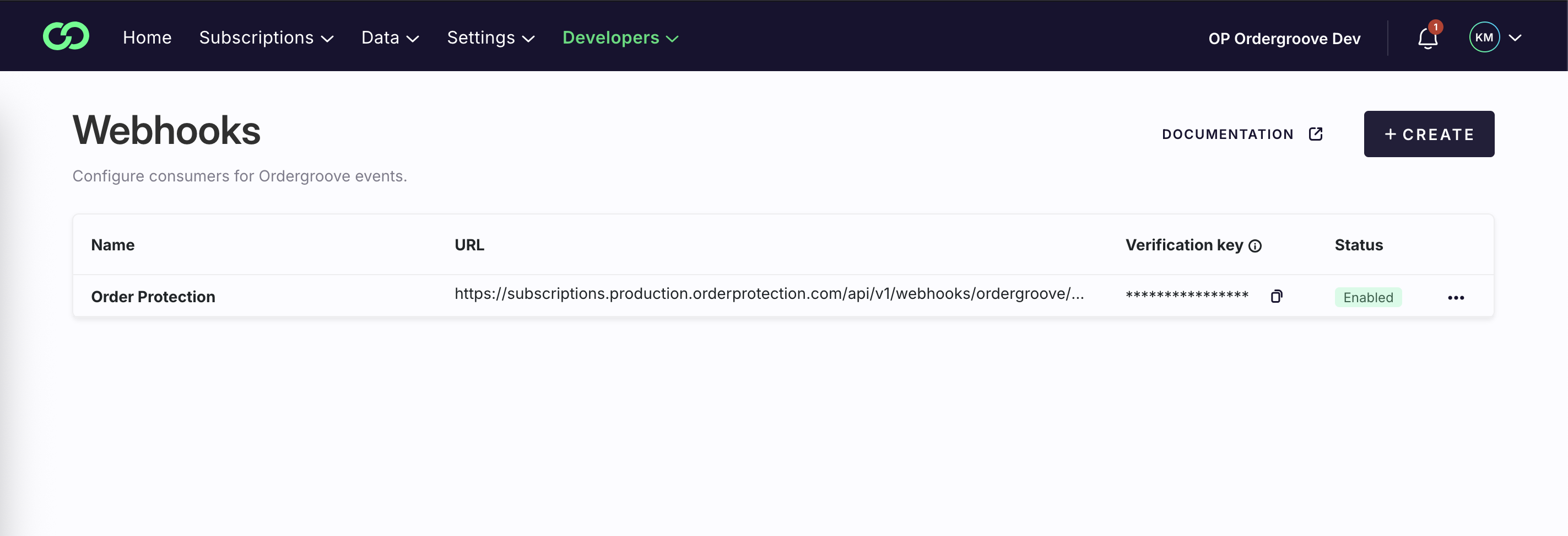
Create a Webhook
Since Ordergroove does not have a way to automate the creation of webhooks, we will need to create them manually.
Replace [PLATFORM_DOMAIN] with your platform domain. e.g. for Shopify it would be example.myshopify.com
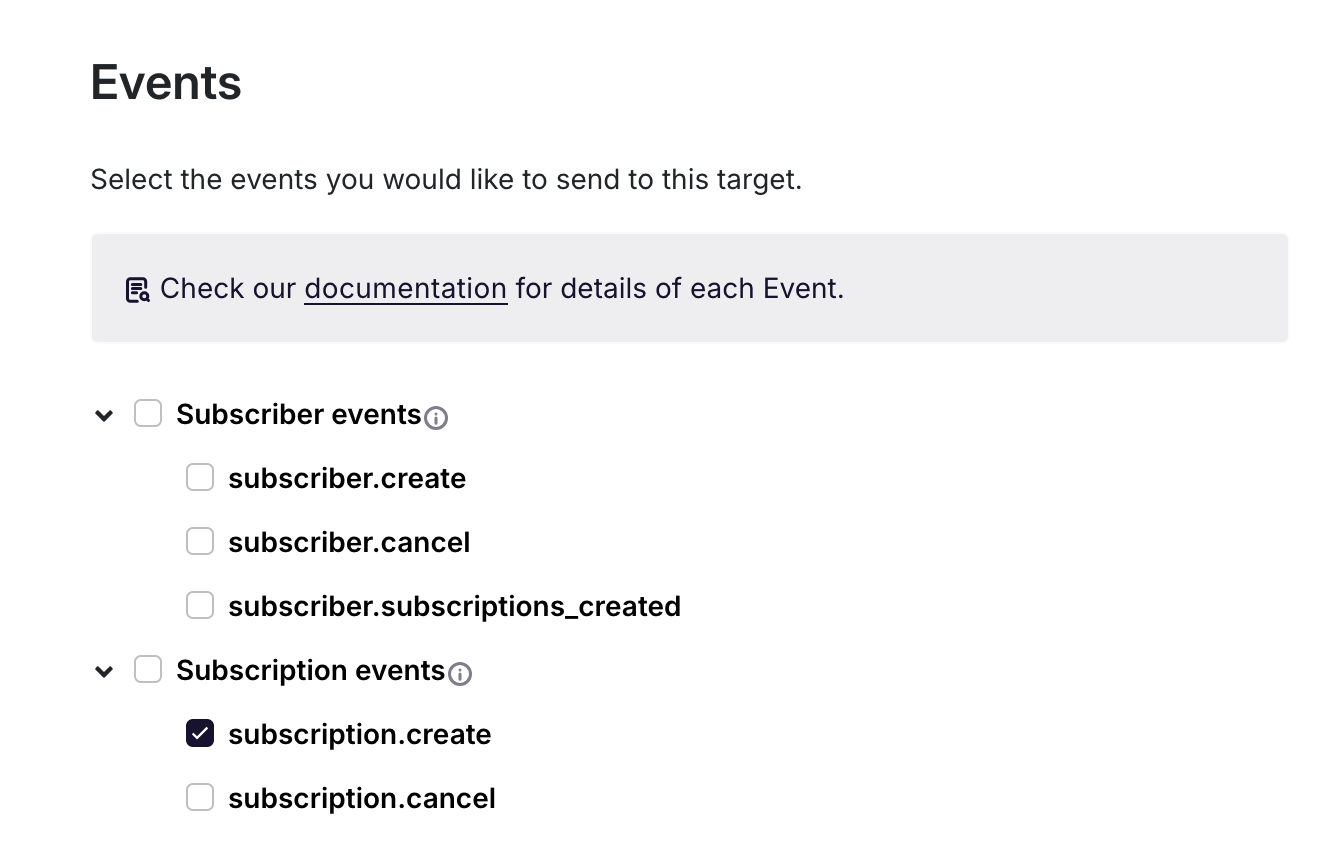
For events, tick only subscription.create
Note: there is a similar event called subscriber.create, please note to tick the correct one
No actions on Advance Settings
Click on Save button
Copy the Verification Key for Step 3
Creating a Webhook
3
Integrate Ordergroove within the Order Protection Platform
Within the Order Protection app, do the following:
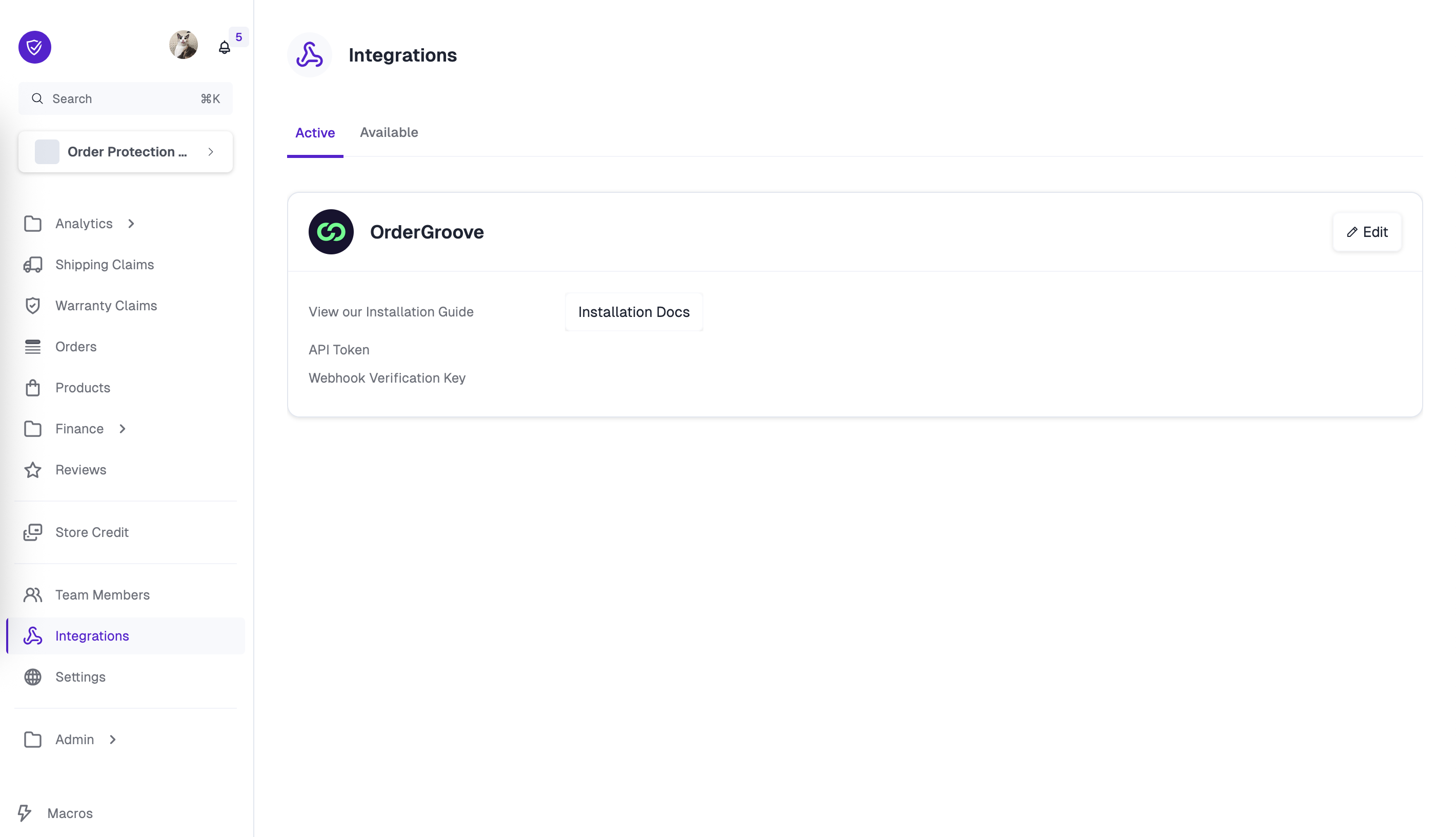
Navigate to Integrations in the left navigation.
Find the Ordergroove block under the Available tab.
Take the API token you created in Step 1 and the Webhook Verification Key you created in Step 2 and add it to the corresponding fields and save.
Once saved, click on the Active tab and the API token and Webhook Verification Key fields within the Ordergroove block will have a hidden value. This means that your token and webhook successfully uploaded.
4
Install Scripts in Ordergroove's Subscription Manager
Go to Subscriptions menu and click on Subscription Manager
Click on Advanced toggle button
On the side menu, click on View
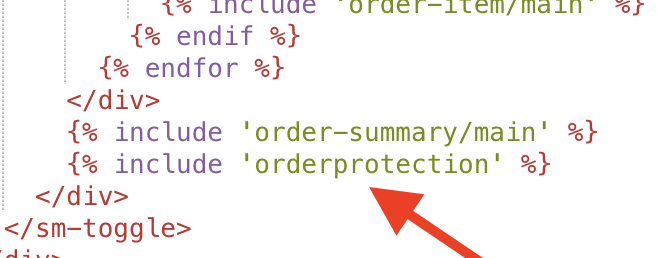
Click on ADD NEW FILE, and name it orderprotection.liquid with content:
Lastly, go to /scripts/script.js and add the following code to the bottom of the file:
script.js
/* * BEGIN ORDER PROTECTION ORDERGROOVE MANAGER * * Loads the OP subscriptions script and initialises one widget per OG order. * * Public API (called from the Liquid template): * bootstrapOrderProtection(params) – called once per OG order row * orderProtectionSendNow(event) – wired to the "Send Now" dialog button *//* ─── Config ─────────────────────────────────────────────────────────────── */const OP_DEBUG = false;const OP_LOG_PREFIX = '[OP]';/* ─── Utilities ──────────────────────────────────────────────────────────── */function opLog(...args) { if (OP_DEBUG) console.log(OP_LOG_PREFIX, ...args);}function opLoadAsset({ tag, attrs, parent = document.head }) { return new Promise((resolve, reject) => { const el = Object.assign(document.createElement(tag), attrs, { onload: () => resolve(el), onerror: reject, }); parent.appendChild(el); });}function opQuerySelector(orderId, selector) { return document.querySelector(`.og-content-wrapper[data-order-id="${orderId}"] ${selector}`);}function opCreateEl(tag, props = {}, children = []) { const el = document.createElement(tag); Object.assign(el, props); el.append(...children); return el;}/* ─── Asset loading ──────────────────────────────────────────────────────── */// Per-store URL derived from the Shopify subdomain — no per-merchant editing.function opResolveScriptUrl() { const shop = window.Shopify && window.Shopify.shop; const slug = shop ? shop.replace(/\.myshopify\.com$/i, '') : ''; if (!slug) { console.error('[OP] Cannot determine shop slug from window.Shopify.shop — subscriptions widget will not load.'); return null; } return `https://cdn.orderprotection.com/subscriptions-widget/${slug}/widget.js`;}const OP_SCRIPT_URL = opResolveScriptUrl();if (OP_SCRIPT_URL) { opLoadAsset({ tag: 'script', attrs: { src: OP_SCRIPT_URL }, parent: document.body }) .then(() => opLog('script loaded')) .catch((err) => opLog('script load error', err));}/* ─── UI update (called on every toggle) ─────────────────────────────────── */function opOnToggled(orderId, enabled) { const instance = window.orderProtection?.[orderId]; if (!instance) return opLog('onToggled: no instance for', orderId); const { format, symbol } = instance.adapter.createCurrencyFormatter(); const subtotal = instance.cart.subtotal; const total = enabled ? subtotal + instance.price : subtotal; // Price heading const priceHeading = opQuerySelector(orderId, '.og-summary-heading.og-price-heading'); if (priceHeading) priceHeading.textContent = format(total); else opLog('priceHeading not found:', orderId); // Order total const totalEl = opQuerySelector(orderId, '.og-total'); if (totalEl) { totalEl.childNodes.forEach((node) => { if (node.textContent?.includes(symbol)) node.textContent = format(total); }); } else { opLog('totalEl not found:', orderId); } // Sub-total (excludes OP line item) const subtotalEl = opQuerySelector(orderId, 'dd[data-testid="order-sub-total"]'); const subTotalWithoutOp = instance.adapter.itemsSubtotal; if (subtotalEl && subTotalWithoutOp) subtotalEl.textContent = format(subTotalWithoutOp); else opLog('subtotalEl not found or zero:', orderId); // Cost breakdown row const breakdownList = opQuerySelector(orderId, 'div.og-cost-breakdown > dl'); if (breakdownList) { const existing = breakdownList.querySelector('.op-cost-breakdown-item'); if (enabled && !existing) { breakdownList.appendChild( opCreateEl('div', { className: 'op-cost-breakdown-item' }, [ opCreateEl('dt', { textContent: 'Shipping Protection' }), opCreateEl('dd', { className: 'og-text-align-right', textContent: format(instance.price) }), ]) ); } if (!enabled) { breakdownList.querySelectorAll('.op-cost-breakdown-item').forEach((el) => el.remove()); } } else { opLog('breakdownList not found:', orderId); }}/* ─── Widget initialisation ──────────────────────────────────────────────── *//** * Called from the Liquid template once per OG order row. * Pushes params to the queue immediately (before the script finishes loading), * so the subscriptions widget drains and creates the instance as soon as it's ready. */function bootstrapOrderProtection(params) { const { order } = params; opLog('bootstrapOrderProtection', order.public_id); // Use the queue pattern: push now, entry.ts creates the instance on load. window.orderProtection = window.orderProtection || []; // If the script is already loaded, window.orderProtection is the live registry object. if (typeof window.orderProtection.create === 'function') { initWidget(params); return; } // Script not yet loaded — push to queue; entry.ts will call create() when ready. // We still need to wire up the toggle handler after the instance is created, // so we poll once per frame until the instance appears in the registry. window.orderProtection.push({ integration: 'ordergroove', instanceId: order.public_id, preexistingData: params, }); waitForInstance(order.public_id).then((instance) => { if (!instance) return opLog('timed out waiting for instance', order.public_id); wireInstance(instance, order.public_id); });}/** Called when the script is already loaded (queue already drained). */function initWidget(params) { const { order } = params; const instanceId = order.public_id; if (window.orderProtection[instanceId]) { return opLog('already initialised:', instanceId); } opLog('initWidget', instanceId); const instance = window.orderProtection.create({ integration: 'ordergroove', instanceId, preexistingData: params, debug: OP_DEBUG, }); wireInstance(instance, instanceId);}/** Attach the toggle UI-update listeners for this instance. */function wireInstance(instance, instanceId) { // ── Store-specific overrides ────────────────────────────────────────────── // Uncomment and customize if your store needs different behavior: // // instance.adapter.sendNow = async () => { /* custom send-now logic */ }; // Object.defineProperty(instance.adapter, 'itemsSubtotal', { get: () => 0 }); // ───────────────────────────────────────────────────────────────────────── instance.on('user-preference/loaded', (data) => opOnToggled(instanceId, data.preference)); instance.on('protection/toggled', (data) => opOnToggled(instanceId, data.checked));}/** * Poll until window.orderProtection[instanceId] exists (entry.ts populated it) * or until timeout. Returns the instance or null. */function waitForInstance(instanceId, timeoutMs = 5000) { return new Promise((resolve) => { const start = Date.now(); const check = () => { const instance = window.orderProtection?.[instanceId]; if (instance) return resolve(instance); if (Date.now() - start > timeoutMs) return resolve(null); requestAnimationFrame(check); }; check(); });}/* ─── Send Now ───────────────────────────────────────────────────────────── *//** * Called from the Liquid template when the customer clicks the "Send Now" button * inside the OG confirmation dialog. This replaces the default OG send-now handler * so that the OP line item is synced into the order before it is dispatched. */async function orderProtectionSendNow(e) { opLog('orderProtectionSendNow'); const btn = e?.currentTarget; if (!btn) return opLog('missing btn'); const dialog = btn.closest('dialog'); const orderId = btn.dataset.orderId || dialog?.querySelector('input[name="order"]')?.value; const instance = orderId ? window.orderProtection?.[orderId] : null; if (!dialog || !orderId || !instance) { opLog('missing params — dialog:', !!dialog, 'orderId:', orderId, 'instance:', !!instance); return; } const btnText = btn.textContent; btn.disabled = true; btn.textContent = 'Loading...'; try { // 1. Sync the OP line item into the OG order (pass the live toggle state so // the server adds or removes OP to match what the customer is looking at). await instance.adapter.syncOpItem(instance.enabled); // 2. Send the order now via the OG REST API await instance.adapter.sendNow(); // 3. Close dialog + refresh OG page state dialog.close(); await window.og.smi.refresh_page_state(); } catch (err) { console.error('[OP] send_now error:', err); } finally { btn.disabled = false; btn.textContent = btnText; }}/* * END ORDER PROTECTION ORDERGROOVE MANAGER */
Once set up, Order Protection will be added to all cart instances within
Shopify subscription orders using Ordergroove. Customers can choose to opt-in or
opt out of Order Protection for their subscription orders.
Customers will be able to file/edit claims per your normal store settings once
an order confirmation email has been sent.
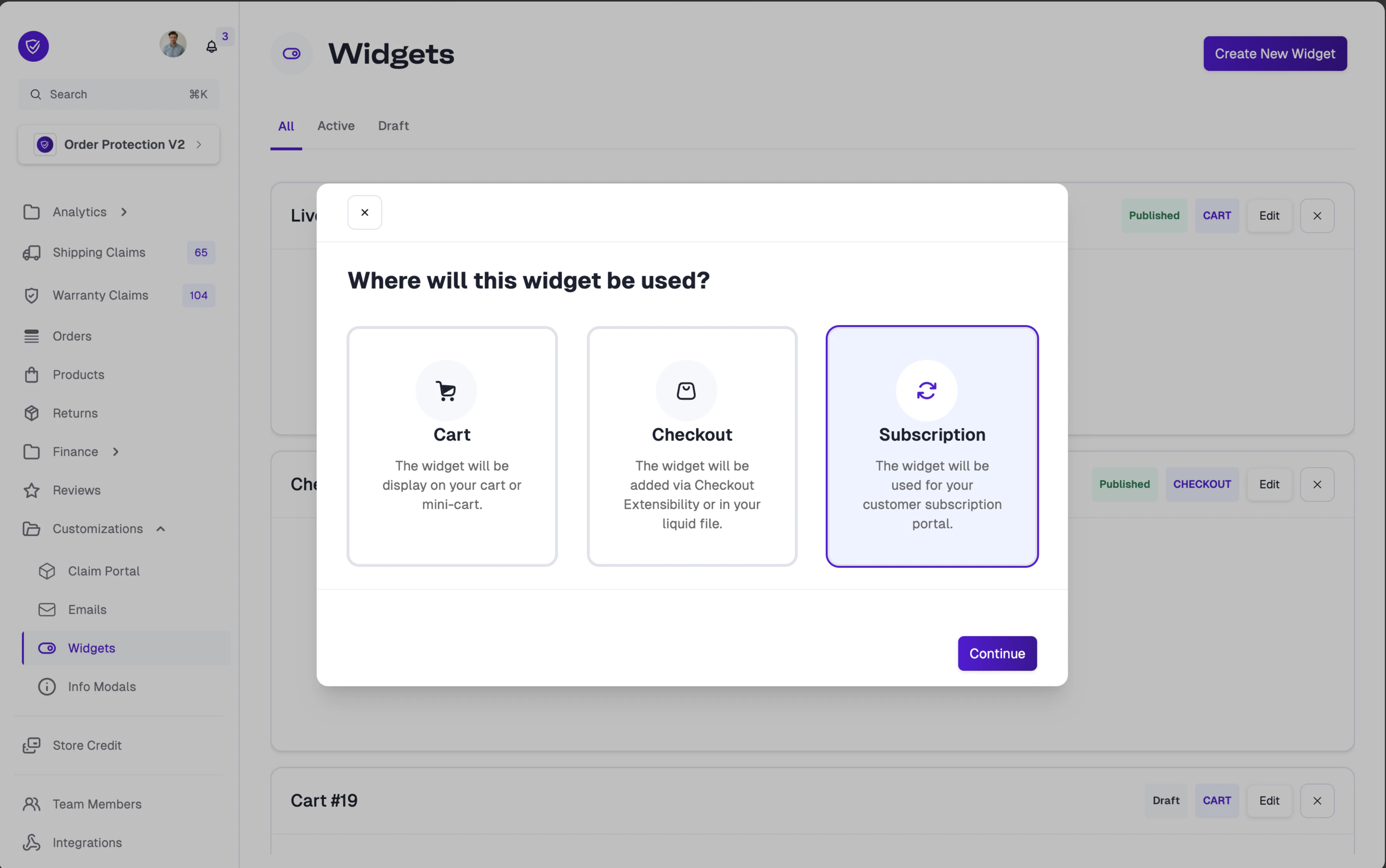
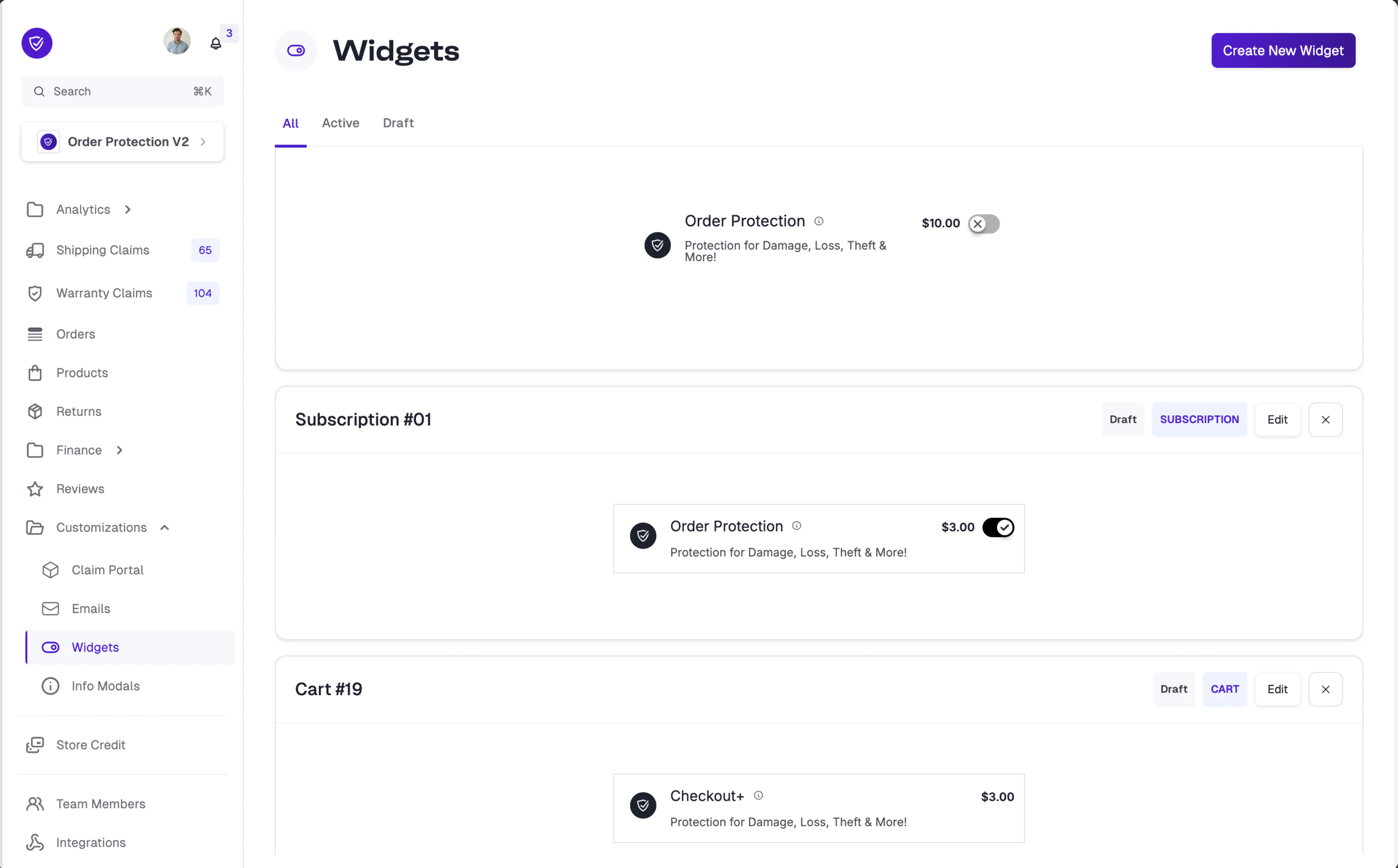
Did you know? You can customize the Order Protection widget styling specifically for your subscription portal. When creating a new widget, select Subscription as the widget type to create a dedicated subscription widget.For full customization options, visit the Widget Customization page.
Assistant
Responses are generated using AI and may contain mistakes.