

checkout-widget UI extension and want each checkout to resolve a specific A/B cohort. It builds on the Partner Integration Quickstart — register your OAuth app and create your variants there first, then use this page to wire the extension to them.
The checkout extension calls the path-based partner endpoints (
/v2/.../partner/:applicationId), not the header-based public read with cohort headers. The three block settings below are what bind a checkout to your cohort.Prerequisites
- An approved OAuth app — see Creating an app. Note your
Application.id(looks likecmpn5in6p000484flmfk9ns4d). - A partner context created for the merchant’s store — see Quickstart, Step 3.
- A price set (Step 4) and a widget config (Step 5) created for each cohort, keyed by your
variantKey. - The
checkout-widgetextension installed on the store — see below.
How the extension gets installed
The OrderProtection Shopify app is not listed in the Shopify App Store. It’s distributed as a custom app per store: OrderProtection creates the app in its Shopify Partners account, deploys the extensions to it, and generates a custom-distribution install link scoped to that store (or, for Shopify Plus, that organization’s stores). After install, thecheckout-widget app block is added to the checkout in the Shopify checkout editor, which is where the block settings below live.
For merchant stores this is part of OrderProtection onboarding. For partner development stores, contact your OrderProtection engineering contact to have the app provisioned and the install link sent over — there is no self-serve install path.
Configure the block settings
When thecheckout-widget extension is added to a store’s checkout, configure three fields under checkout-widget → Block settings. A partner (e.g. PDQ) sets these at install time.
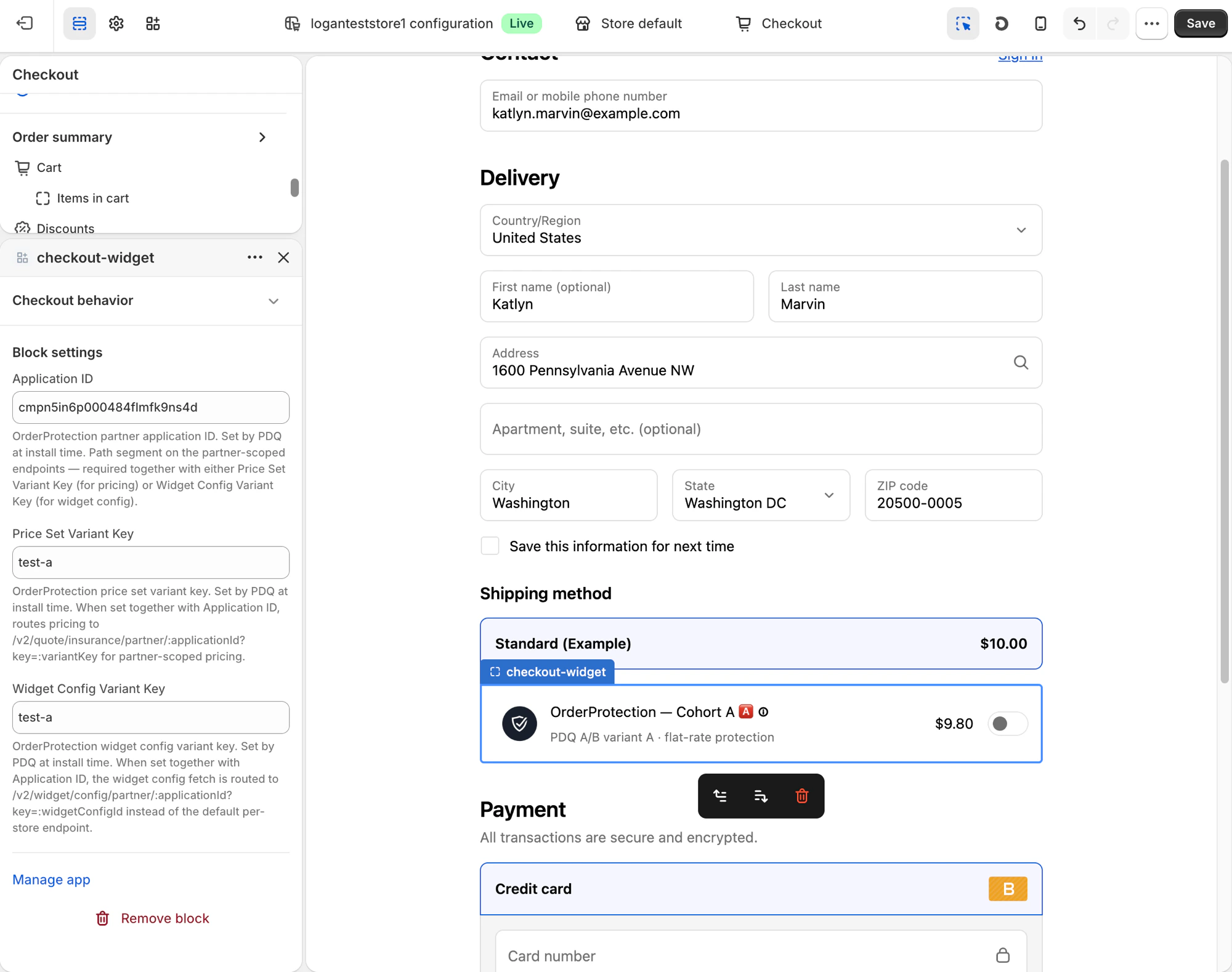
The block settings state selects one of three modes:
Runtime cohort binding (cart attributes)
Static block settings pin every session on a checkout to one cohort. Partners whose experimentation assigns cohorts during the session (for example, after the buyer enters their email and address) bind at runtime instead, using two cart attributes:
Values are the same partner-chosen cohort strings used when creating price sets and widget configs through the API (
^[a-zA-Z0-9_.:-]{1,64}$) — not ids OrderProtection generates, and not Shopify product variant ids. Your extension writes them with Shopify’s Attributes API (applyAttributeChange, type: "updateAttribute"). Cart attributes are shared checkout state across apps, which is what makes them the cross-extension channel.
Session lifecycle
- Setup, once per store: the
checkout-widgetblock is added with Application ID set and both variant-key fields empty. Onecheckout-widgetblock — no per-variant blocks, and no checkout-editor changes per test. - Per test, API only: create a price set and a
CHECKOUTwidget config pervariantKey. A control arm is avariantKeywhose price set hasnoOp: true. - Per session: the widget renders nothing while it waits, and makes no cohort pricing or widget-config requests for a surface until that surface’s key exists. When your extension allocates, it writes both attributes — the widget stays hidden until both exist.
- The widget fetches that cohort’s pricing and widget config from the partner endpoints below, renders, and applies the cohort’s auto-add behavior. A
noOpcohort renders nothing and removes any protection line. - Re-allocation mid-session is supported — the widget refetches and, on toggle-layout cohorts, swaps the protection line (tile-layout cohorts keep the existing line until the buyer interacts) — but it never re-runs the auto-add decision (a buyer’s explicit choice is not overridden). Don’t clear the attributes after allocating, and never express the control arm by not writing them: always allocate explicitly, so “not allocated yet” and “control” stay distinguishable.
- Cart attributes become note attributes on the resulting Shopify order (standard Shopify behavior), so the cohort keys are available in order payloads and webhooks for your per-order test attribution.
Rules and edge cases
- Write both attributes at allocation time. One without the other keeps the widget hidden.
- Don’t half-fill the block settings. Application ID with only one variant-key field filled leaves the other surface waiting for an attribute that may never come, so the widget stays hidden. Fill both fields (static mode) or neither (runtime mode).
- Invalid values are treated as absent (client-side validation against the key pattern), falling back to the block-setting value if one exists, otherwise back to the hold.
- Attributes override filled block settings when both are present. But leave the fields empty on runtime checkouts: a filled field pins a cohort that renders immediately on page load and then swaps when the allocation lands — the hold only engages when the fields are empty. Filled fields are useful for debugging a cohort statically, not for live tests.
- Missing cohort data falls back visibly, per surface: a key with a widget config but no
SHIPPINGprice set renders the cohort’s appearance with the store’s merchant fallback pricing (the pricing fetch 404s); a key with a price set but noCHECKOUTwidget config renders the merchant’s appearance with cohort pricing. If either half looks wrong during setup, check both resources exist for that exactvariantKey. - Wallet checkouts (Apple Pay, Google Pay) reject extension cart changes — attribute writes and protection line-adds alike — so protection can’t be sold in those sessions by any binding mode; in runtime mode they simply stay unallocated and hidden. Shop Pay is expected to work — it’s the full checkout surface, and buyer details arriving prefilled means allocation can fire immediately — but it hasn’t been verified end-to-end yet.
- Unallocated sessions stay hidden indefinitely by design. The partner owns allocation reliability; there is no timeout fallback to a default widget.
Impression signal (write-back)
On runtime-allocated sessions, the widget reports back through two more cart attributes so your extension can verify — in-session — that the impression actually landed:
Reason values:
no_op (the cohort is a noOp control arm — expected behavior), out_of_range (cart subtotal outside the cohort’s price rules), country_excluded (destination or geo exclusion), not_eligible (pickup, B2B, hidden shipping method, nothing shippable), error (the pricing fetch failed).
Read it as a tri-state after writing your allocation attributes:
_op_renderedpresent — the impression happened. Treat this as authoritative even if a stale reason briefly coexists (the retraction is best-effort).- Reason present, no
_op_rendered— the widget ran and declined; the value says why.no_opis your control arm working correctly, not a failure. - Neither appears — the widget never ran: missing block, misconfigured checkout, broken extension, or a wallet flow. This is the setup-problem signal, and it works precisely because it’s an absence — a missing renderer can’t self-report.
Channel longevity:
applyAttributeChange is deprecated in Shopify’s 2026+ checkout API versions in favor of cart metafields (it remains fully supported on the API versions the extensions currently pin). When pinned versions sunset, this channel migrates to a shared cart metafield with the same contract — coordinate the swap with OrderProtection before bumping your extension’s api_version.What the extension fetches
Once configured, on each checkout render the extension calls the partner-scoped endpoints below. Both are public (no OAuth token) and resolve the cohort from the pathapplicationId + key query param.
Pricing — GET /v2/quote/insurance/partner/:applicationId
SHIPPING price set. Responses are cached for ~1 hour per (store_url, country, applicationId, key) (plus the A/B session token when one is present).
Errors
400 Bad Request—keyis missing, orapplicationId/keydon’t match the partner key format.404 Not Found— the store isn’t found, the app isn’t installed, or the cohort has noSHIPPINGpricing rules.
Widget config — GET /v2/widget/config/partner/:applicationId
config and customizationValues always hold the same value; customizationValues is the legacy column name. Responses are cached for ~1 hour per (store_url, applicationId, key, type).
Errors
400 Bad Request—keyis missing, orapplicationId/keydon’t match the partner key format.404 Not Found— the store isn’t found, the app has no active context on that store, or no widget config exists for that(variantKey, type).
Default vs. cohort render
The explainer below walks the whole flow — authenticate, create variants, configure the extension, and render per shopper: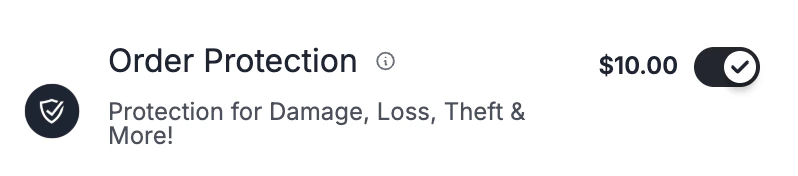
test-a, the same checkout resolves the cohort’s price set and widget config — for example OrderProtection — Cohort A at $9.80 with flat-rate protection, as shown in the checkout preview above.
Next steps
Partner Integration Quickstart
Register your app and create your cohorts’ pricing and widget configs — the setup this page depends on.
Partner endpoints reference
Full schema for every
/v2 partner endpoint, including the contexts, pricing, and widget-config writes.Creating an app
Register an OAuth app and capture your
Application.id, client ID, and secret.Scopes
Scopes your app needs to create contexts, price sets, and widget configs.