> ## Documentation Index
> Fetch the complete documentation index at: https://docs.orderprotection.com/llms.txt
> Use this file to discover all available pages before exploring further.

# Smartrr

> All your subscription orders can now offer guaranteed delivery

<Note>
  The Order Protection widget integrates with Smartrr and your Shopify store,
  enhancing the subscription order experience for users with all relevant
  information in one place.

  The widget addition to the cart simplifies the claim-filing process for users reducing friction and eliminating the need for manual navigation to the Order Protection website.
</Note>

## Installation

<Steps>
  <Step title="Generate an API Token">
    Access the Smartrr admin page: [Smartrr
    Admin](https://app.smartrr.com/login)

    * Go to `Integrations` in the Sidebar.
    * Click `API Keys` tab at the top button.
    * Click `"Create key"` button in the top right.
    * Choose a `Token Nickname` and `Application Name`
    * Choose permissions:
      * `Subscription: Read & Write access`
      * `Product: Read access`
      * `Customer: Read access`
      * `Webhook: Read & Write access`
    * Click `"Create"` button.

    <Frame caption="Creating an API Token">
      <img src="https://mintcdn.com/orderprotectioncom/GDuchlp6KbhScehe/public/assets/img/smartrr/smartrr-01.png?fit=max&auto=format&n=GDuchlp6KbhScehe&q=85&s=d21bfb25c34bec2083a8f9129e7ee794" alt="API Token" width="2846" height="1652" data-path="public/assets/img/smartrr/smartrr-01.png" />
    </Frame>
  </Step>

  <Step title="Integrate Smartrr within the Order Protection Platform">
    For this step, speak with your **Onboarding and Implementation** manager to
    properly set up the API token and applicable webhooks.
  </Step>

  <Step title="Install Smartrr Integration Manager on Shopify">
    <Note>
      These changes are done within the Shopify platform.
    </Note>

    To install the Smartrr Integration Manager on Shopify, follow these steps:

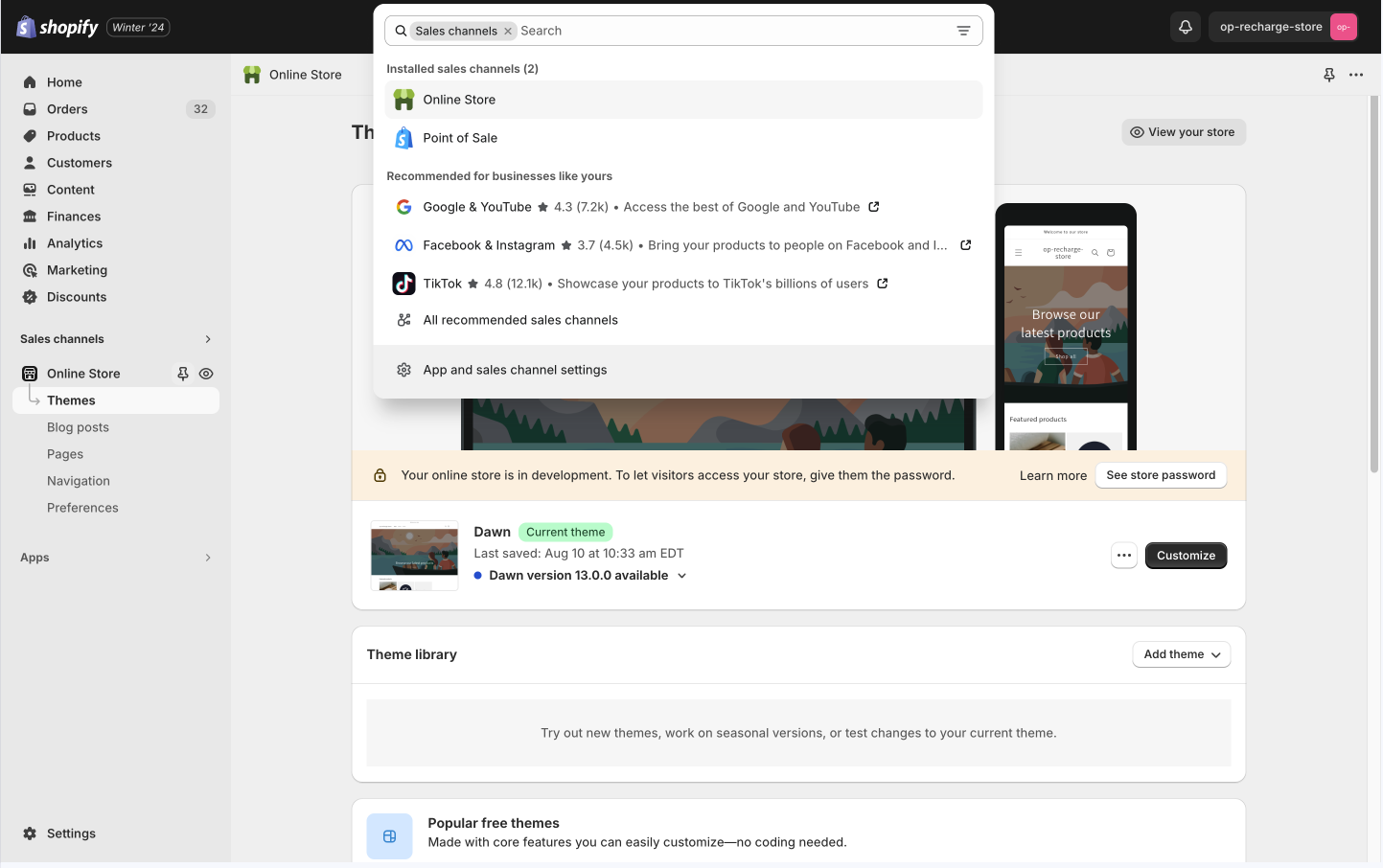
    * In the left navigation, go to `Sales Channels` and select `Online Store`
          <img src="https://mintcdn.com/orderprotectioncom/GDuchlp6KbhScehe/public/assets/img/recharge/recharge-2.png?fit=max&auto=format&n=GDuchlp6KbhScehe&q=85&s=0b19b982c98232a08b2b11ed7a326c43" alt="shopify online store" width="1443" height="906" data-path="public/assets/img/recharge/recharge-2.png" />
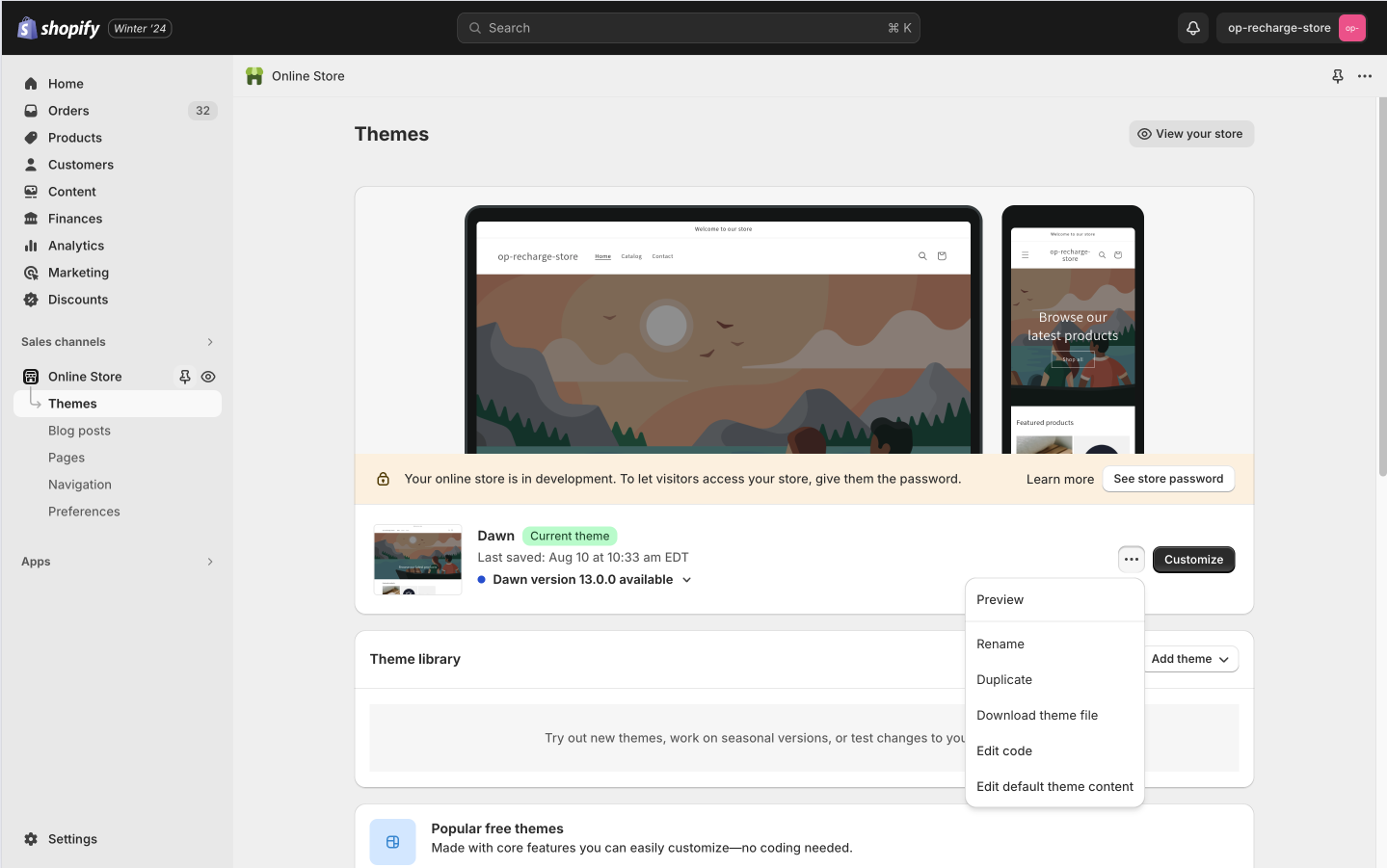
    * Within the `Theme Settings`, select `Edit Code`
          <img src="https://mintcdn.com/orderprotectioncom/GDuchlp6KbhScehe/public/assets/img/recharge/recharge-3.png?fit=max&auto=format&n=GDuchlp6KbhScehe&q=85&s=cf19675091b4ad2540135fada48c7d8a" alt="Edit Code" width="1439" height="901" data-path="public/assets/img/recharge/recharge-3.png" />
    * Create a file in `snippets` folder and name it `orderprotection-smartrr.liquid`
          <img src="https://mintcdn.com/orderprotectioncom/GDuchlp6KbhScehe/public/assets/img/smartrr/smartrr-02.png?fit=max&auto=format&n=GDuchlp6KbhScehe&q=85&s=983cd239be46fa1b91e57f49ecc76fc0" alt="Paste code" width="2854" height="1672" data-path="public/assets/img/smartrr/smartrr-02.png" />
    * Open the newly created `orderprotection-smartrr.liquid` file and insert the following code and save:

    ```javascript orderprotection-smartrr.liquid theme={null}
    <!-- BEGIN ORDERPROTECTION SMARTRR MANAGER -->
    <link rel="stylesheet" href="https://cdn.orderprotection.com/widget/subscriptions/latest/style.css" />
    <script src="https://cdn.orderprotection.com/widget/subscriptions/latest/orderprotection.js"></script>

    <script>
      const opDebug = false;
      let initialized = false;
      let smartrrWidget = null;
      let subId = '';

      const toggleFn = () => {
        if (!window.orderProtection.cart.subtotal || !window.orderProtection.price) return;

        const totalWOp = window.orderProtection.cart.subtotal + window.orderProtection.price;
        const totalNoOp = window.orderProtection.cart.subtotal;
        const formatter = new Intl.NumberFormat(undefined, {
          style: 'currency',
          currency: window.Shopify.currency.active,
        });
        const formattedSubtotalOP = formatter.format(totalWOp / 100);
        const formattedSubtotalNoOp = formatter.format(totalNoOp / 100);
        const subtotalCls = `.smartrr-portal-discounts-wrapper .smartrr-portal-estimated-total-line p:nth-child(2)`;
        const subtotalEl = document.querySelector(subtotalCls);

        if (!subtotalEl) return;

        subtotalEl.innerText = window.orderProtection.enabled ? formattedSubtotalOP : formattedSubtotalNoOp;
      };

      const observer = new MutationObserver(async mutations => {
        const subDiscountCls = '.smartrr-portal-manage-subs-modal .smartrr-portal-discount-input-wrapper';
        const subDiscountEl = document.querySelector(subDiscountCls);

        if (subDiscountEl && !initialized) {
          initialized = true;

          subId = document.querySelector('.smartrr-portal-modal-main-title')?.innerHTML.replace(/#/g, '') || '';

          const opNewEl = document.createElement('div');
          opNewEl.id = 'order-protection' + subId;

          subDiscountEl.parentNode.insertBefore(opNewEl, subDiscountEl);

          console.log('OP-log: ready to go');
          smartrrWidget = OrderProtection.createOrderProtectionWidget({
            integration: 'smartrr',
            attach: true,
            debug: opDebug,
            locations: [{ id: 'order-protection' + subId }],
            version: 'v2',
          });

          smartrrWidget.cart.debug = opDebug;
          smartrrWidget.widget.on('toggled', toggleFn);

          let shouldRetry = true;

          while (shouldRetry) {
            try {
              if (!smartrrWidget.cart.isReady()) {
                smartrrWidget.cart.subscription = {};
                await smartrrWidget.cart.loadSubscription();
                await new Promise(resolve => setTimeout(resolve, 200));

                continue;
              }

              smartrrWidget.cart.setup();
              smartrrWidget.init();

              shouldRetry = false;
            } catch (error) {
              shouldRetry = false;
              console.error(error);
            }
          }
        } else if (!subDiscountEl && initialized) {
          initialized = false;

          smartrrWidget.widget.off('toggled', toggleFn);
          smartrrWidget.destroy();
          smartrrWidget.cart.destroy();

          const opEl = document.querySelector('#order-protection' + subId);
          if (opEl) opEl.remove();

          setTimeout(() => {
            if (typeof window !== 'undefined') window.orderProtection = null;
          }, 100);
        }
      });

      observer.observe(document.body, {
        childList: true,
        subtree: true,
      });
    </script>
    <!-- END ORDERPROTECTION SMARTRR MANAGER -->
    ```

    * Open the `theme.liquid` file and insert the following code in the bottom of the `body`:
          <img src="https://mintcdn.com/orderprotectioncom/GDuchlp6KbhScehe/public/assets/img/smartrr/smartrr-03.png?fit=max&auto=format&n=GDuchlp6KbhScehe&q=85&s=37689cffc57d136c90485b791a733464" alt="Paste code" width="2856" height="1670" data-path="public/assets/img/smartrr/smartrr-03.png" />

    ```javascript theme.liquid theme={null}
    {% render 'orderprotection-smartrr' %}
    ```
  </Step>
</Steps>

<Check>
  Once set up, Order Protection will be added to all cart instances within
  Shopify subscription orders using Smartrr. Customers can choose to opt-in or
  opt out of Order Protection for their subscription orders.
</Check>

<Note>
  Customers will be able to file/edit claims per your normal store settings once
  an order confirmation email has been sent.
</Note>

<Tip>
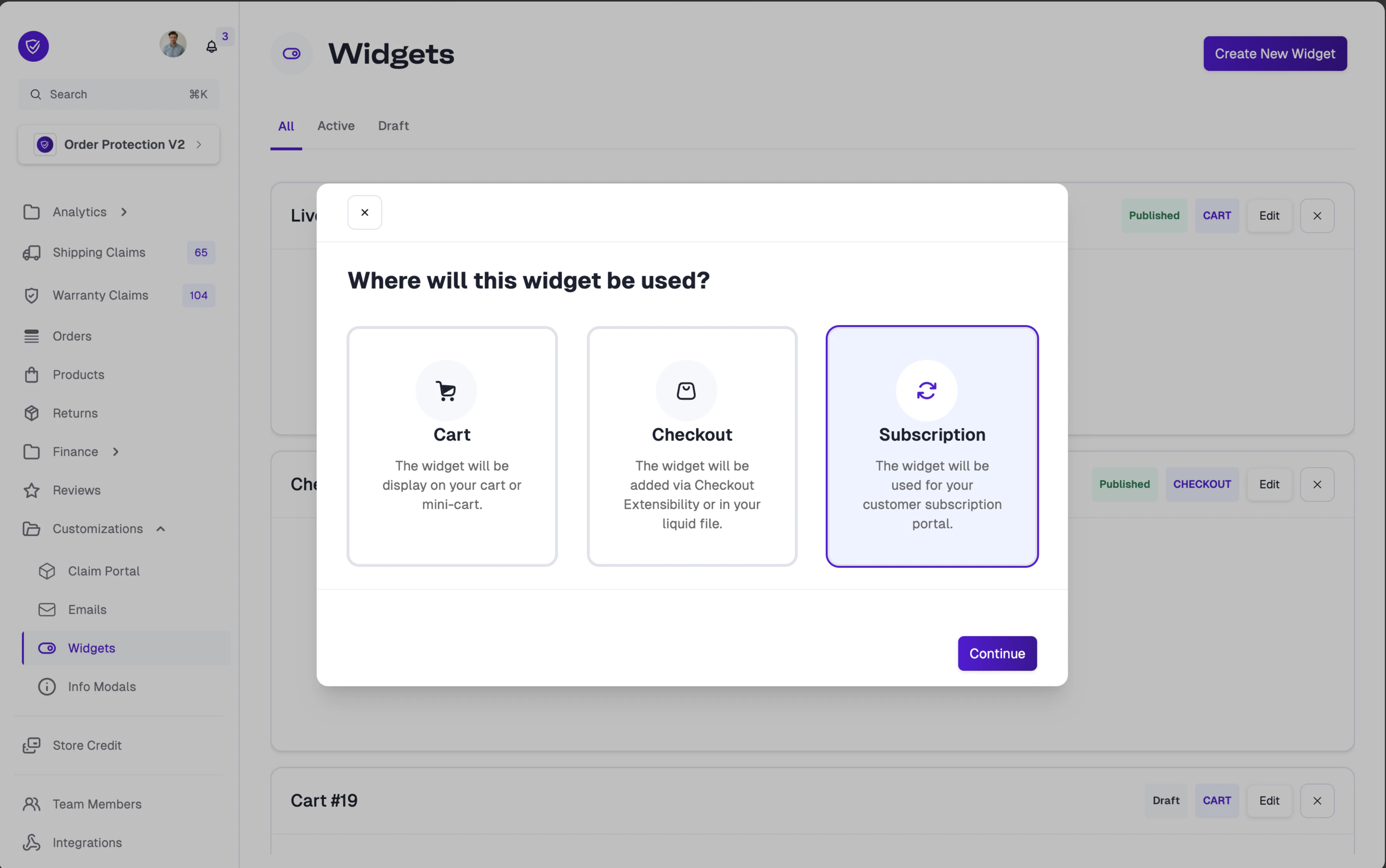
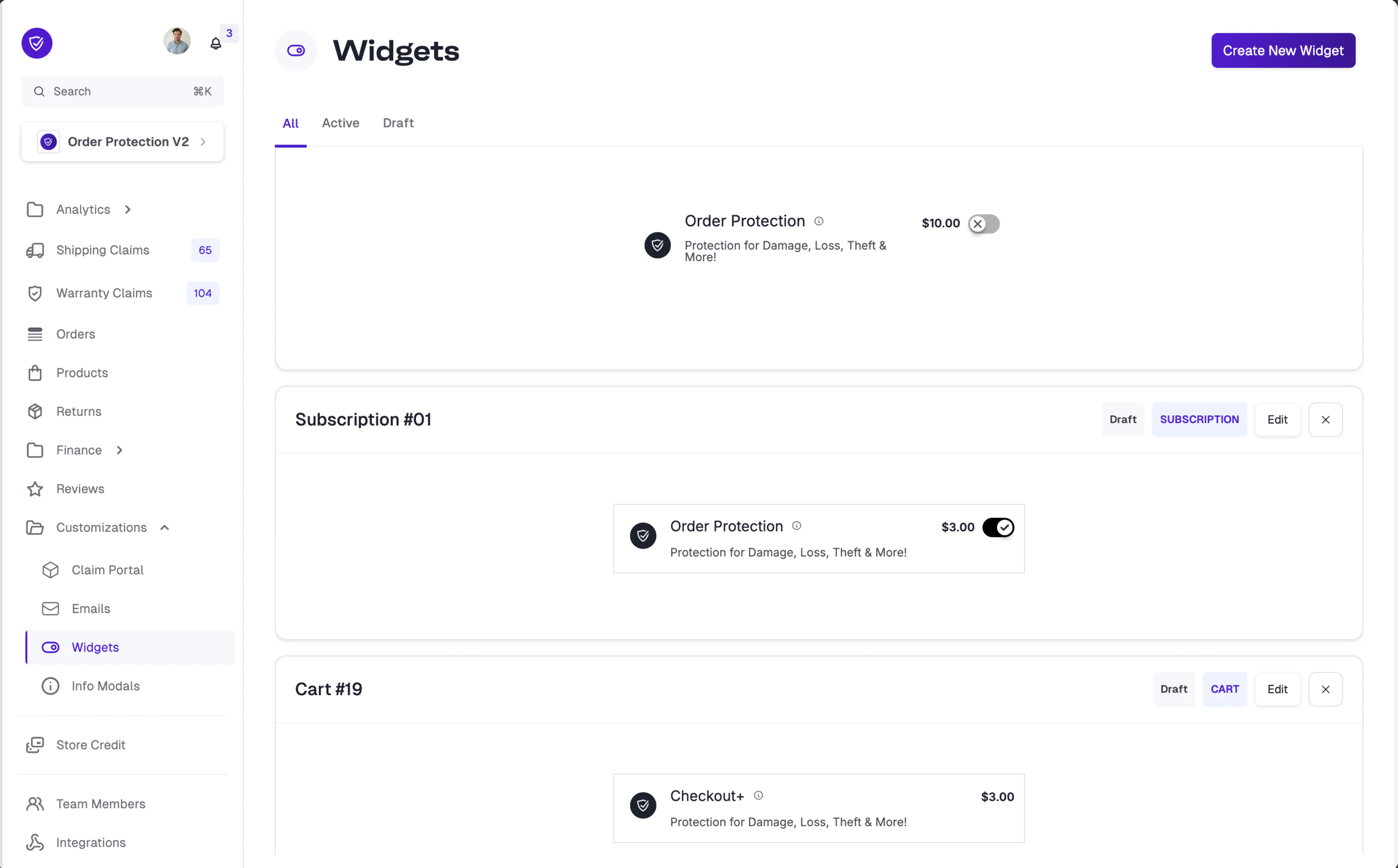
  **Did you know?** You can customize the Order Protection widget styling specifically for your subscription portal. When creating a new widget, select **Subscription** as the widget type to create a dedicated subscription widget.

  <img src="https://mintcdn.com/orderprotectioncom/6PHukXPBD9AnZd7s/public/assets/img/education-basecamp/widgets/widget-subscription-type-selector.png?fit=max&auto=format&n=6PHukXPBD9AnZd7s&q=85&s=2d2cf94caf2c4df7a0850230b0cd8ac9" alt="Widget type selector with Subscription option highlighted" width="3562" height="2232" data-path="public/assets/img/education-basecamp/widgets/widget-subscription-type-selector.png" />

  <img src="https://mintcdn.com/orderprotectioncom/6PHukXPBD9AnZd7s/public/assets/img/education-basecamp/widgets/widget-subscription-list.png?fit=max&auto=format&n=6PHukXPBD9AnZd7s&q=85&s=05fe38e82bc6c46e6c0a331df1a64605" alt="Widgets list showing a Subscription widget type" width="3584" height="2226" data-path="public/assets/img/education-basecamp/widgets/widget-subscription-list.png" />

  For full customization options, visit the [Widget Customization](https://docs.orderprotection.com/education-basecamp/customizations/widgets) page.
</Tip>