> ## Documentation Index
> Fetch the complete documentation index at: https://docs.orderprotection.com/llms.txt
> Use this file to discover all available pages before exploring further.
# Manufacturer & Extended Warranties
> How brand-funded manufacturer warranties and customer-funded extended warranties work — setup, pricing, and how customers file a claim.
Order Protection supports two kinds of product warranties:
* **Manufacturer warranties** are *brand-funded* — you stand behind your products for defects during a coverage period you define.
* **Extended warranties** are *customer-funded* — a customer pays at checkout to extend coverage beyond the manufacturer period, and you earn a share of that revenue.
This page covers how each is set up, priced, and claimed.
## Manufacturer warranties
A manufacturer warranty is coverage you (the brand) stand behind for product **defects and durability issues** — separate from shipping claims, which cover problems in transit. You define how long products are covered, which products are eligible, and how claims can be resolved. Manufacturer warranties are **brand-funded**: Order Protection bills you per claim based on the pricing model you choose.
### Configuring manufacturer warranties
Manufacturer warranties are configured under **Settings → Warranties**.
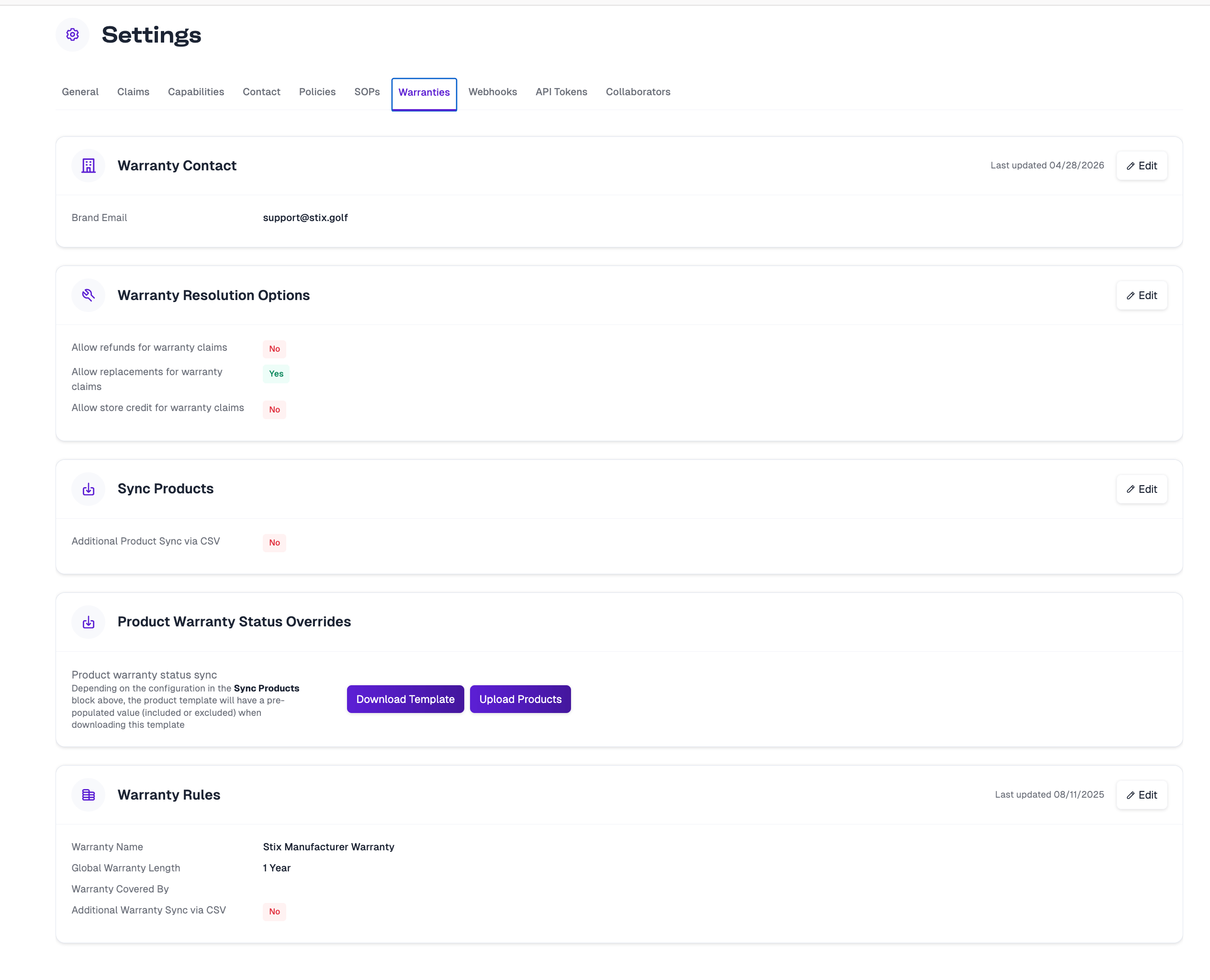 * **Warranty Contact** — the brand email that warranty matters route to.
* **Warranty Rules** — the **Warranty Name** and the **Global Warranty Length** (the default coverage length — for example, 1 year — applied to your eligible products).
* **Warranty Resolution Options** — toggles for how warranty claims can be resolved: **refunds**, **replacements/reships**, and/or **store credit**. Only the options you enable are offered on a claim.
### Product eligibility and warranty length
Your Global Warranty Length applies to eligible products by default. From the **Product Warranty Status Overrides** card you can fine-tune coverage per product:
* **Eligibility** — mark specific products as included or excluded from warranty coverage. Changing a parent product cascades to its variants.
* **Per-product length** — give specific products a different warranty length than the global default.
Use **Download Template** to export your catalog, set the eligibility and length columns, and **Upload Products** to apply the changes.
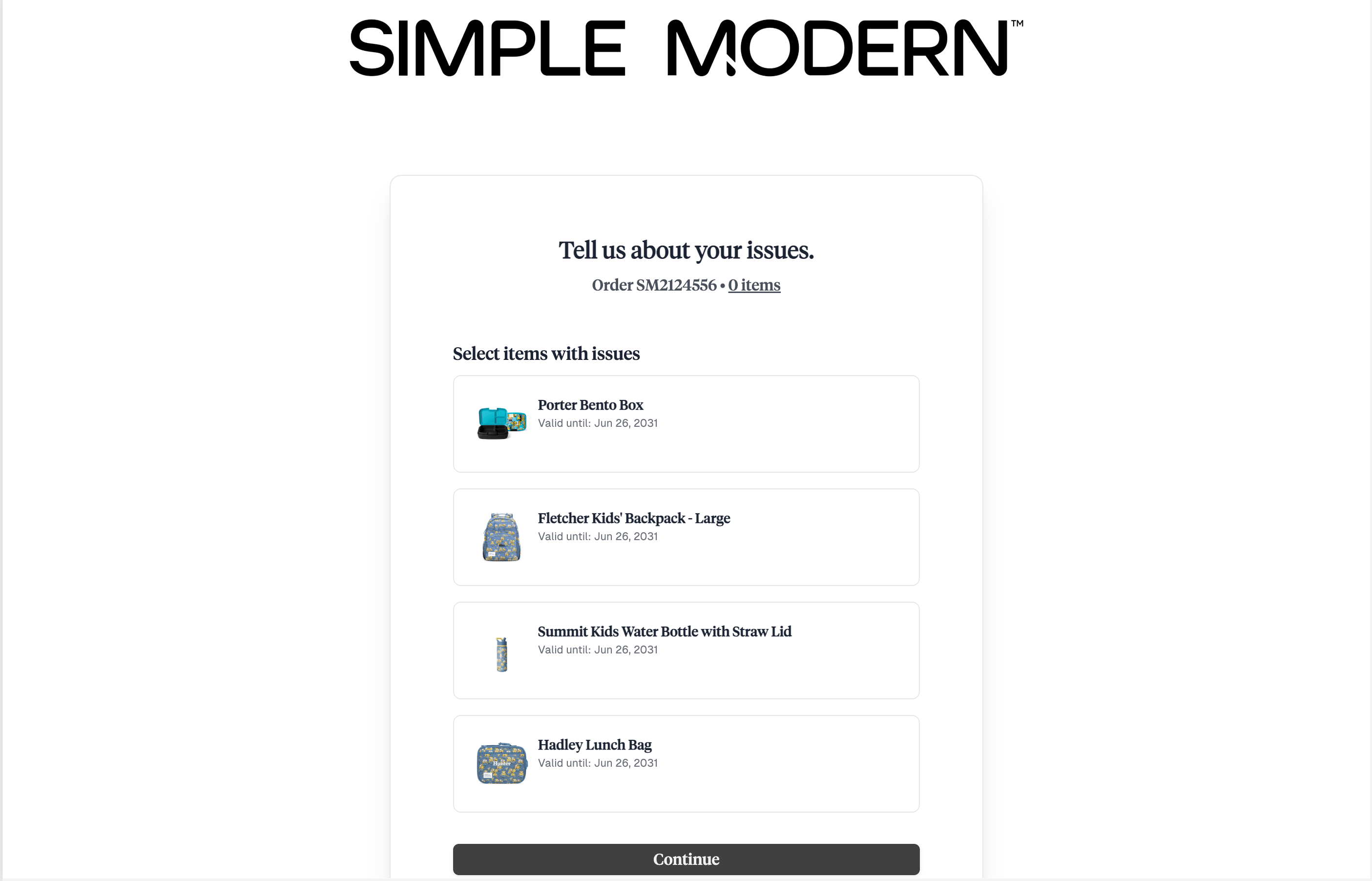
When a customer files a claim, this coverage surfaces as a **"Valid until"** date on each item — the ship date plus the item's warranty length — so they can see at a glance what's still covered.
* **Warranty Contact** — the brand email that warranty matters route to.
* **Warranty Rules** — the **Warranty Name** and the **Global Warranty Length** (the default coverage length — for example, 1 year — applied to your eligible products).
* **Warranty Resolution Options** — toggles for how warranty claims can be resolved: **refunds**, **replacements/reships**, and/or **store credit**. Only the options you enable are offered on a claim.
### Product eligibility and warranty length
Your Global Warranty Length applies to eligible products by default. From the **Product Warranty Status Overrides** card you can fine-tune coverage per product:
* **Eligibility** — mark specific products as included or excluded from warranty coverage. Changing a parent product cascades to its variants.
* **Per-product length** — give specific products a different warranty length than the global default.
Use **Download Template** to export your catalog, set the eligibility and length columns, and **Upload Products** to apply the changes.
When a customer files a claim, this coverage surfaces as a **"Valid until"** date on each item — the ship date plus the item's warranty length — so they can see at a glance what's still covered.
 ### Pricing and billing (brand-funded)
Because manufacturer warranties are brand-funded, Order Protection bills you per claim. This pricing is **set in partnership with the Order Protection team** — you have view access to it in your dashboard, but it's configured together with OP rather than edited on your own. Pricing is defined over a **claim-value range**, with **Brand** as the payer, and a **pricing model** that determines how each charge is calculated:
### Pricing and billing (brand-funded)
Because manufacturer warranties are brand-funded, Order Protection bills you per claim. This pricing is **set in partnership with the Order Protection team** — you have view access to it in your dashboard, but it's configured together with OP rather than edited on your own. Pricing is defined over a **claim-value range**, with **Brand** as the payer, and a **pricing model** that determines how each charge is calculated:
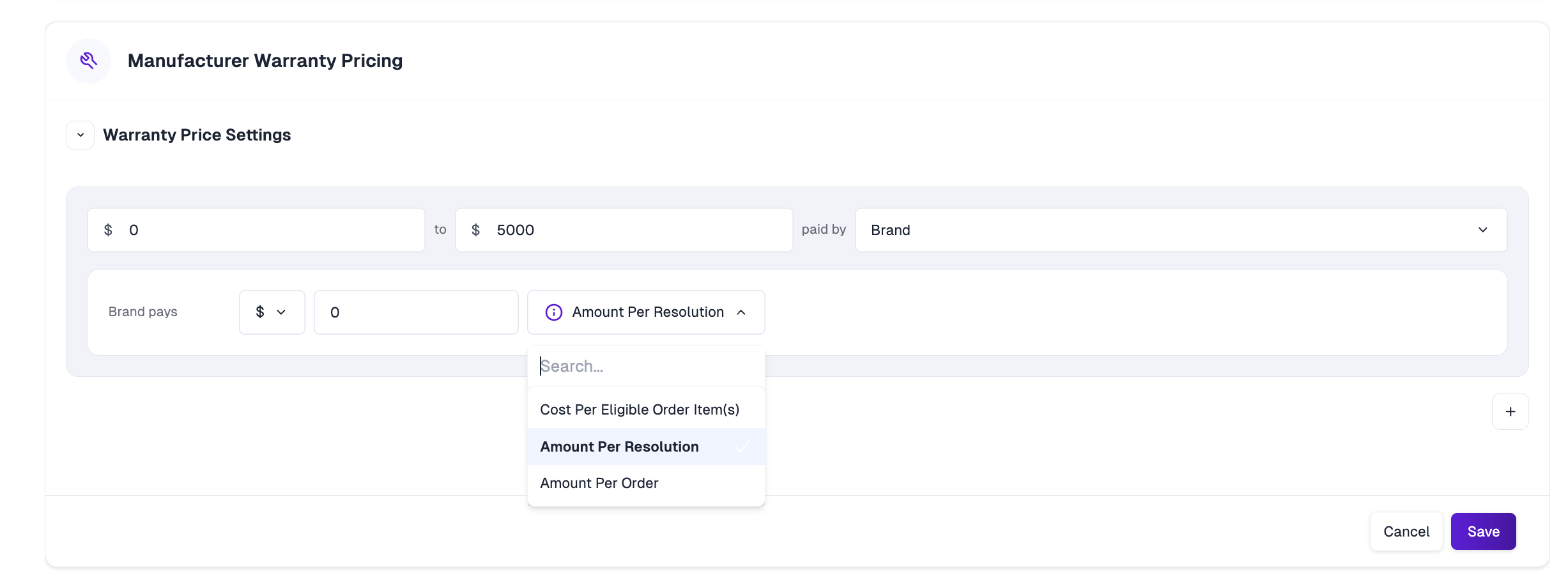 * **Cost Per Eligible Order Item** — a set amount for each covered item on the claim.
* **Amount Per Resolution** — a set amount based on the resolution issued.
* **Amount Per Order** — a flat amount per claim, regardless of item count.
### Filing a manufacturer warranty claim
From the customer's side, filing a warranty claim is straightforward:
The customer enters their order number and email in your claim portal.
Each item shows a **"Valid until"** date. Items still within their warranty window are selectable; expired items are shown as ineligible.
For each item, the customer picks **What's the issue with this item?** (for example, Damaged or Defective), then a more specific **sub-issue type** (for example, Broken Lid or Broken Handle), and adds photos and details.
The customer selects from the resolution options you enabled (refund, replacement/reship, or store credit).
* **Cost Per Eligible Order Item** — a set amount for each covered item on the claim.
* **Amount Per Resolution** — a set amount based on the resolution issued.
* **Amount Per Order** — a flat amount per claim, regardless of item count.
### Filing a manufacturer warranty claim
From the customer's side, filing a warranty claim is straightforward:
The customer enters their order number and email in your claim portal.
Each item shows a **"Valid until"** date. Items still within their warranty window are selectable; expired items are shown as ineligible.
For each item, the customer picks **What's the issue with this item?** (for example, Damaged or Defective), then a more specific **sub-issue type** (for example, Broken Lid or Broken Handle), and adds photos and details.
The customer selects from the resolution options you enabled (refund, replacement/reship, or store credit).
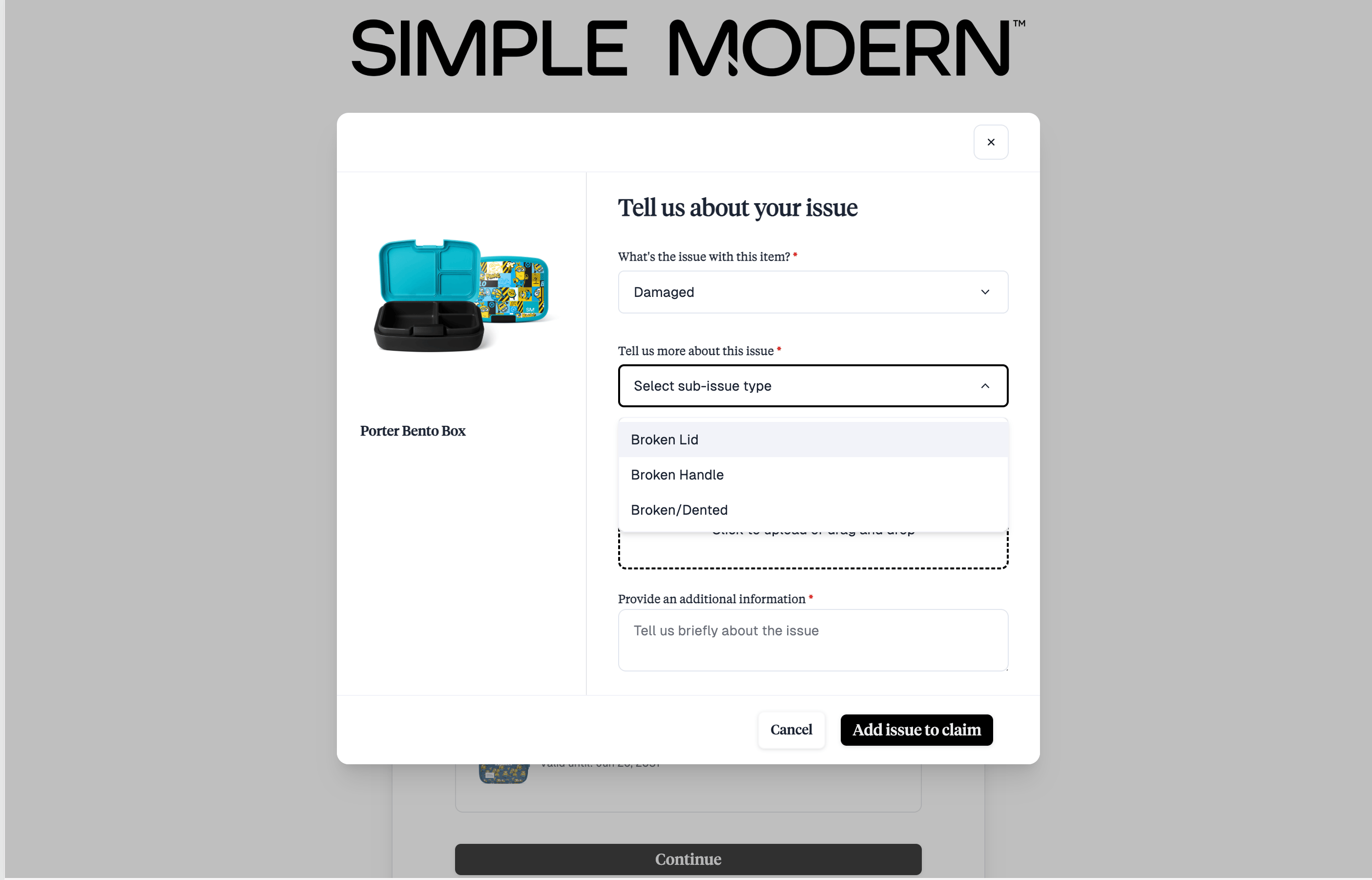 Sub-issue types are configurable per brand — see [Claim Sub-Type Setup](/education-basecamp/claims/claim-settings#claim-sub-type-setup). For items purchased outside your store, warranty claims use [alternate sales channels](/education-basecamp/claims/claim-settings#alternate-sales-channel-settings).
## Extended warranties
An extended warranty is **customer-funded** coverage that extends protection **beyond** the manufacturer warranty period. Instead of the brand covering the cost, the customer opts in and pays for the longer coverage — and the brand earns a share of that revenue.
### Offered at the order level (not the product page)
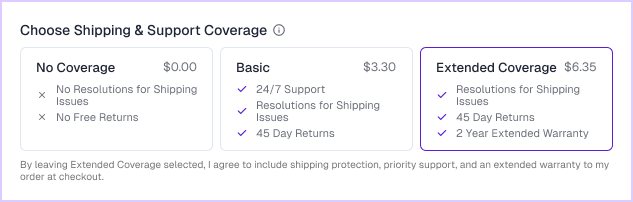
Order Protection sells extended warranties at the **order level** — as a coverage choice the customer makes once at checkout — rather than as options on each product page. At checkout the customer picks a **coverage tier** (for example, No Coverage, Basic, or Extended Coverage — which bundles an extended warranty with shipping protection and support), and the warranty applies to the eligible items in that order. You define the available warranty lengths yourself in settings; they aren't limited to any fixed term.
Sub-issue types are configurable per brand — see [Claim Sub-Type Setup](/education-basecamp/claims/claim-settings#claim-sub-type-setup). For items purchased outside your store, warranty claims use [alternate sales channels](/education-basecamp/claims/claim-settings#alternate-sales-channel-settings).
## Extended warranties
An extended warranty is **customer-funded** coverage that extends protection **beyond** the manufacturer warranty period. Instead of the brand covering the cost, the customer opts in and pays for the longer coverage — and the brand earns a share of that revenue.
### Offered at the order level (not the product page)
Order Protection sells extended warranties at the **order level** — as a coverage choice the customer makes once at checkout — rather than as options on each product page. At checkout the customer picks a **coverage tier** (for example, No Coverage, Basic, or Extended Coverage — which bundles an extended warranty with shipping protection and support), and the warranty applies to the eligible items in that order. You define the available warranty lengths yourself in settings; they aren't limited to any fixed term.
 We do this on purpose. Offering warranties per product would force you to create a **separate variant for every warranty length** — "29″ Blue Bike – 2-year warranty," "29″ Blue Bike – 3-year warranty," and so on — cluttering your catalog and complicating inventory. Selling at the order level keeps a single, clean product and variant, and moves the warranty decision to checkout.
### Pricing (customer-funded)
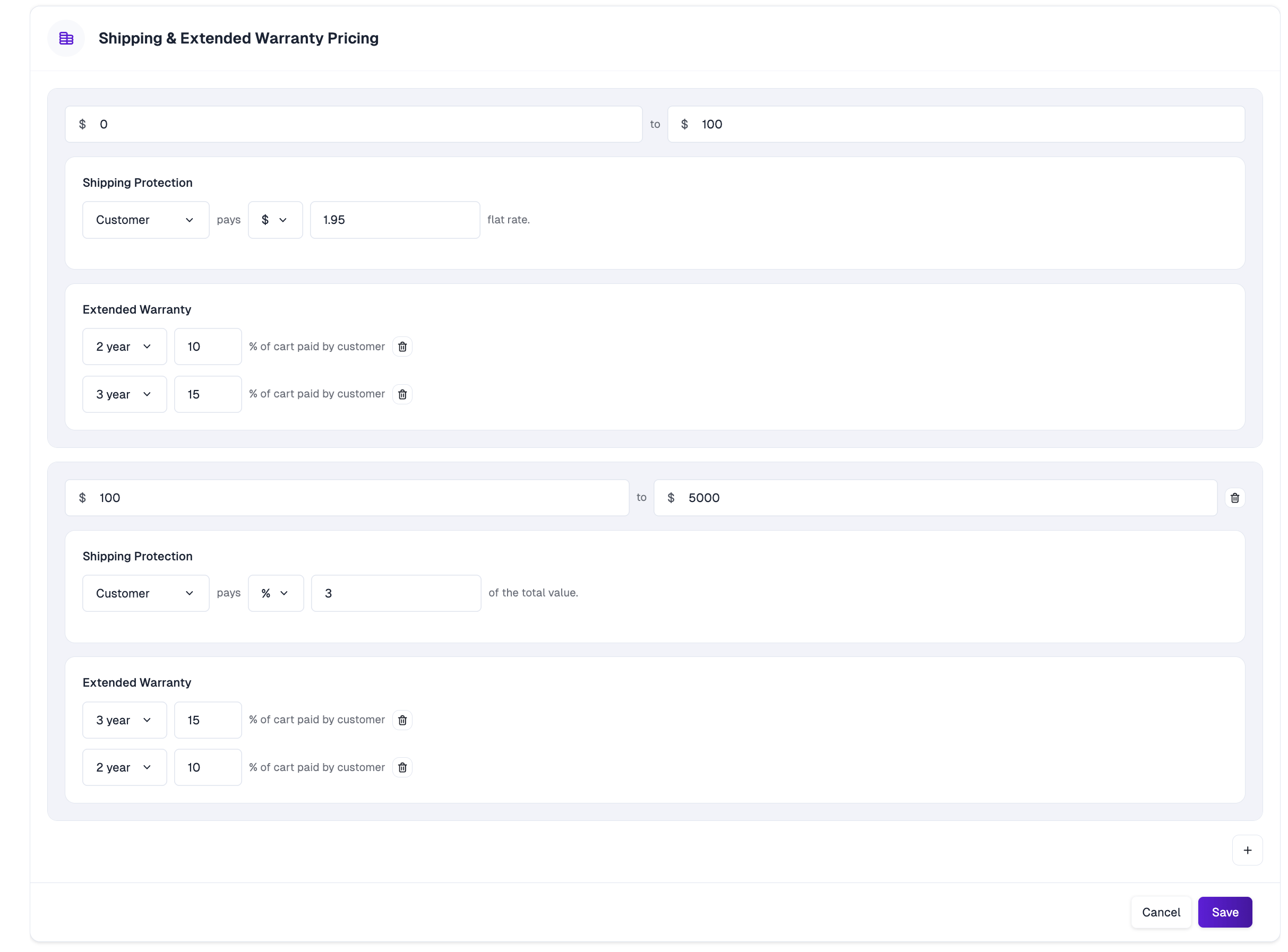
Extended warranty pricing is configured under **Shipping & Extended Warranty Pricing**, tiered by **cart value**. Within each tier you offer one or more **warranty length options that you define** (for example, 2-year or 3-year), each priced as a **percentage of cart paid by the customer**, alongside your shipping-protection pricing.
We do this on purpose. Offering warranties per product would force you to create a **separate variant for every warranty length** — "29″ Blue Bike – 2-year warranty," "29″ Blue Bike – 3-year warranty," and so on — cluttering your catalog and complicating inventory. Selling at the order level keeps a single, clean product and variant, and moves the warranty decision to checkout.
### Pricing (customer-funded)
Extended warranty pricing is configured under **Shipping & Extended Warranty Pricing**, tiered by **cart value**. Within each tier you offer one or more **warranty length options that you define** (for example, 2-year or 3-year), each priced as a **percentage of cart paid by the customer**, alongside your shipping-protection pricing.
 ### Revenue share
Extended warranties carry a **higher revenue share back to the brand than shipping protection** — and the reason comes down to how payouts work. Extended warranties have **no claim reimbursements**: Order Protection doesn't fund claim payouts on them. The only payout on an extended warranty premium is revenue share, so a larger portion of each premium is returned to you.
A **lower** revenue share. Part of each premium funds claim reimbursements when shipping claims are approved.
A **higher** revenue share. There are no claim reimbursements — revenue share is the only payout on the premium.
**How the revenue share is calculated.** When shipping protection and an extended warranty are sold together in a single coverage tier, revenue share is calculated in two steps — **shipping protection first, then the extended warranty on what remains.**
For example, a coverage tier that includes shipping protection and a 2-year extended warranty, with a 30% shipping revenue share and an 80% extended-warranty revenue share:
```
Coverage tier premium: $10.00
1. Shipping protection revenue share: $10.00 x 30% = $3.00
2. Extended warranty revenue share: ($10.00 - $3.00) x 80% = $5.60
─────────────────────────────
Total revenue share to the brand: $3.00 + $5.60 = $8.60
```
The extended-warranty revenue share is applied to the premium **after** the shipping-protection share is taken out first.
The extended-warranty revenue-share percentage is set by Order Protection. Reach out to your Customer Success Manager if you have questions about your rate.
### Filing an extended warranty claim
From the customer's point of view, filing an extended warranty claim is **identical** to a manufacturer warranty claim. The extended warranty simply pushes the item's **"Valid until"** date further out — the customer sees a single combined expiry and files the same way.
## Manufacturer vs. extended at a glance
| | Manufacturer warranty | Extended warranty |
| ------------------------- | ------------------------------------------- | ---------------------------------------- |
| **Funded by** | The brand | The customer |
| **Coverage period** | A length you define | Extends beyond the manufacturer period |
| **Where it's offered** | Automatically on eligible products | Chosen by the customer at checkout |
| **Where it's configured** | Settings → Warranties (+ product overrides) | Shipping & Extended Warranty Pricing |
| **Catalog impact** | None | None — sold at the order level by design |
| **Revenue** | A cost per claim to the brand | The brand earns a share of the premium |
| **Filing a claim** | Same portal flow | Same portal flow |
## Questions?
If you have questions about setting up warranties, pricing, or your revenue share, reach out to your Customer Success Manager or your shared Slack channel.
### Revenue share
Extended warranties carry a **higher revenue share back to the brand than shipping protection** — and the reason comes down to how payouts work. Extended warranties have **no claim reimbursements**: Order Protection doesn't fund claim payouts on them. The only payout on an extended warranty premium is revenue share, so a larger portion of each premium is returned to you.
A **lower** revenue share. Part of each premium funds claim reimbursements when shipping claims are approved.
A **higher** revenue share. There are no claim reimbursements — revenue share is the only payout on the premium.
**How the revenue share is calculated.** When shipping protection and an extended warranty are sold together in a single coverage tier, revenue share is calculated in two steps — **shipping protection first, then the extended warranty on what remains.**
For example, a coverage tier that includes shipping protection and a 2-year extended warranty, with a 30% shipping revenue share and an 80% extended-warranty revenue share:
```
Coverage tier premium: $10.00
1. Shipping protection revenue share: $10.00 x 30% = $3.00
2. Extended warranty revenue share: ($10.00 - $3.00) x 80% = $5.60
─────────────────────────────
Total revenue share to the brand: $3.00 + $5.60 = $8.60
```
The extended-warranty revenue share is applied to the premium **after** the shipping-protection share is taken out first.
The extended-warranty revenue-share percentage is set by Order Protection. Reach out to your Customer Success Manager if you have questions about your rate.
### Filing an extended warranty claim
From the customer's point of view, filing an extended warranty claim is **identical** to a manufacturer warranty claim. The extended warranty simply pushes the item's **"Valid until"** date further out — the customer sees a single combined expiry and files the same way.
## Manufacturer vs. extended at a glance
| | Manufacturer warranty | Extended warranty |
| ------------------------- | ------------------------------------------- | ---------------------------------------- |
| **Funded by** | The brand | The customer |
| **Coverage period** | A length you define | Extends beyond the manufacturer period |
| **Where it's offered** | Automatically on eligible products | Chosen by the customer at checkout |
| **Where it's configured** | Settings → Warranties (+ product overrides) | Shipping & Extended Warranty Pricing |
| **Catalog impact** | None | None — sold at the order level by design |
| **Revenue** | A cost per claim to the brand | The brand earns a share of the premium |
| **Filing a claim** | Same portal flow | Same portal flow |
## Questions?
If you have questions about setting up warranties, pricing, or your revenue share, reach out to your Customer Success Manager or your shared Slack channel.