> ## Documentation Index
> Fetch the complete documentation index at: https://docs.orderprotection.com/llms.txt
> Use this file to discover all available pages before exploring further.
# Introduction
> Build apps that extend the OrderProtection platform for merchants.
## Welcome to the Developer Platform
The OrderProtection Developer Platform lets you build apps that integrate with the OrderProtection ecosystem. Your apps can access merchant data through secure OAuth 2.0 APIs, react to real-time events via webhooks, and even embed custom UI directly inside the merchant dashboard.
### What you can build
Build public apps that any OrderProtection merchant can discover and install from the marketplace.
Create private apps for your own account's stores — never listed in the marketplace, and no admin review unless they request admin-gated scopes.
Embed your app's UI directly inside the merchant dashboard with single sign-on via session tokens.
You don't need a separate developer account. **Any OrderProtection account can build apps** — an **account owner** can create **private apps for their own stores** (no extra signup), while **third-party developers** build public marketplace apps or reach a merchant's stores through collaborations. The guides below apply to both.
### How it works
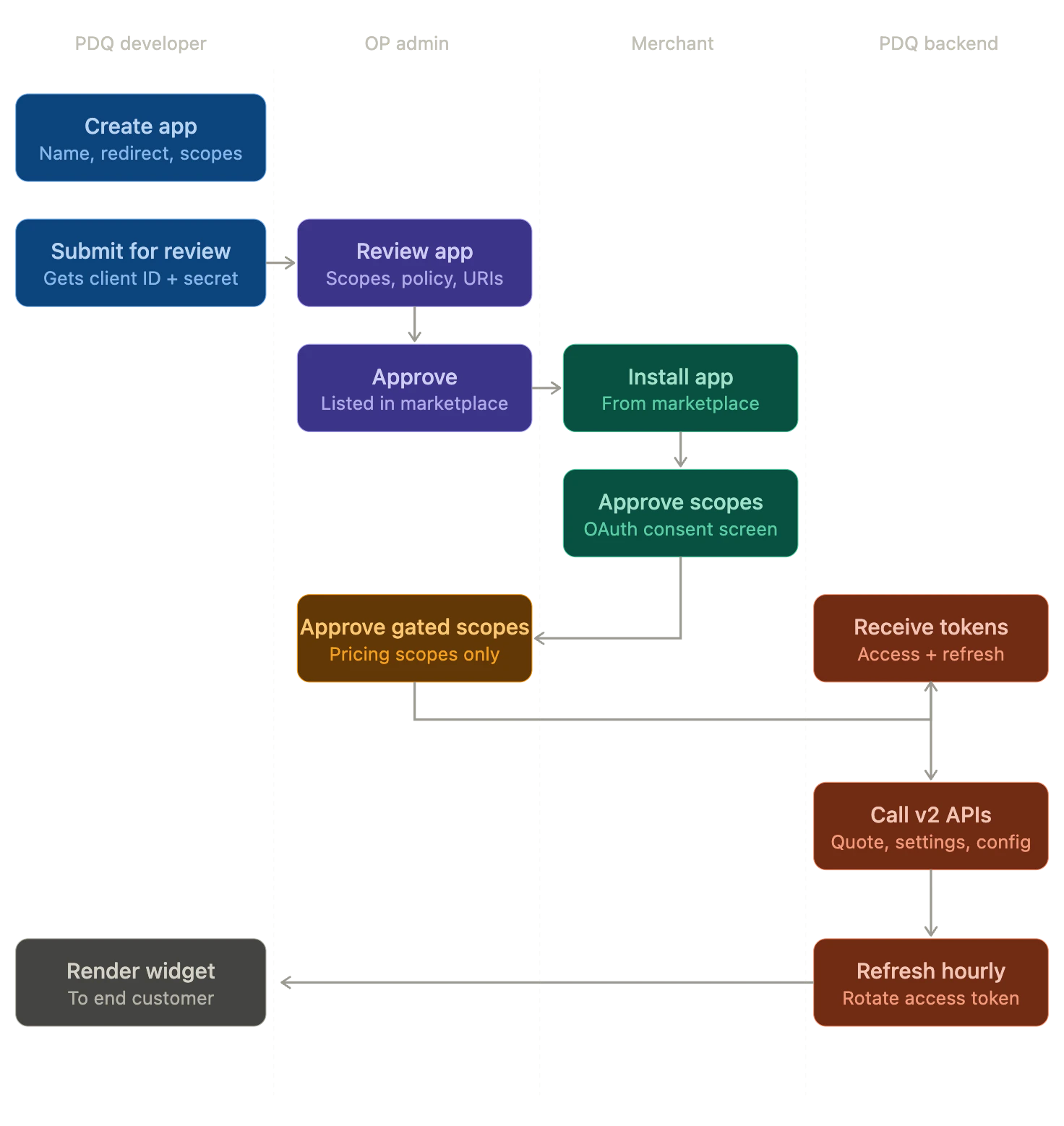 1. **Create an app** in the Developer section of your OrderProtection dashboard
2. **Configure scopes** to declare what data your app needs access to
3. **Merchants install your app** and grant the permissions you requested
4. **You receive an authorization code** at your redirect URI
5. **Exchange the code for API tokens** to access merchant data
Your app authenticates using standard OAuth 2.0 flows. Access tokens are scoped to the specific permissions each merchant granted, ensuring your app only accesses the data it needs.
### Base URL
All API requests are made to:
```
https://api.production.orderprotection.com
```
### Quick links
Step-by-step guide to creating and configuring an app.
Learn how OAuth 2.0 flows work and how to exchange tokens.
See every available permission and what it grants access to.
Embed your UI inside the merchant dashboard with session tokens.
1. **Create an app** in the Developer section of your OrderProtection dashboard
2. **Configure scopes** to declare what data your app needs access to
3. **Merchants install your app** and grant the permissions you requested
4. **You receive an authorization code** at your redirect URI
5. **Exchange the code for API tokens** to access merchant data
Your app authenticates using standard OAuth 2.0 flows. Access tokens are scoped to the specific permissions each merchant granted, ensuring your app only accesses the data it needs.
### Base URL
All API requests are made to:
```
https://api.production.orderprotection.com
```
### Quick links
Step-by-step guide to creating and configuring an app.
Learn how OAuth 2.0 flows work and how to exchange tokens.
See every available permission and what it grants access to.
Embed your UI inside the merchant dashboard with session tokens.