> ## Documentation Index
> Fetch the complete documentation index at: https://docs.orderprotection.com/llms.txt
> Use this file to discover all available pages before exploring further.
# Checkout Extension
> Install OrderProtection's Shopify checkout UI extension and point each checkout at a partner A/B cohort.
This page is for **partners who render OrderProtection inside Shopify checkout** through the `checkout-widget` UI extension and want each checkout to resolve a specific A/B cohort. It builds on the [Partner Integration Quickstart](/developer/partner-integration-quickstart) — register your OAuth app and create your variants there first, then use this page to wire the extension to them.
The checkout extension calls the **path-based partner endpoints** (`/v2/.../partner/:applicationId`), not the header-based public read documented in the [Quickstart](/developer/partner-integration-quickstart#step-4-route-each-shopper-to-a-variant). The three block settings below are what bind a checkout to your cohort.
## Prerequisites
* An **approved OAuth app** — see [Creating an app](/developer/creating-an-app). Note your `Application.id` (looks like `cmpn5in6p000484flmfk9ns4d`).
* At least one **partner context / variant** created for the merchant's store — see [Quickstart, Step 3](/developer/partner-integration-quickstart#step-3-create-one-or-more-variants).
* A **price set** and a **widget config** attached to that variant, keyed by your `variantKey`.
## Configure the block settings
When the `checkout-widget` extension is added to a store's checkout, configure three fields under **checkout-widget → Block settings**. A partner (e.g. PDQ) sets these at install time.
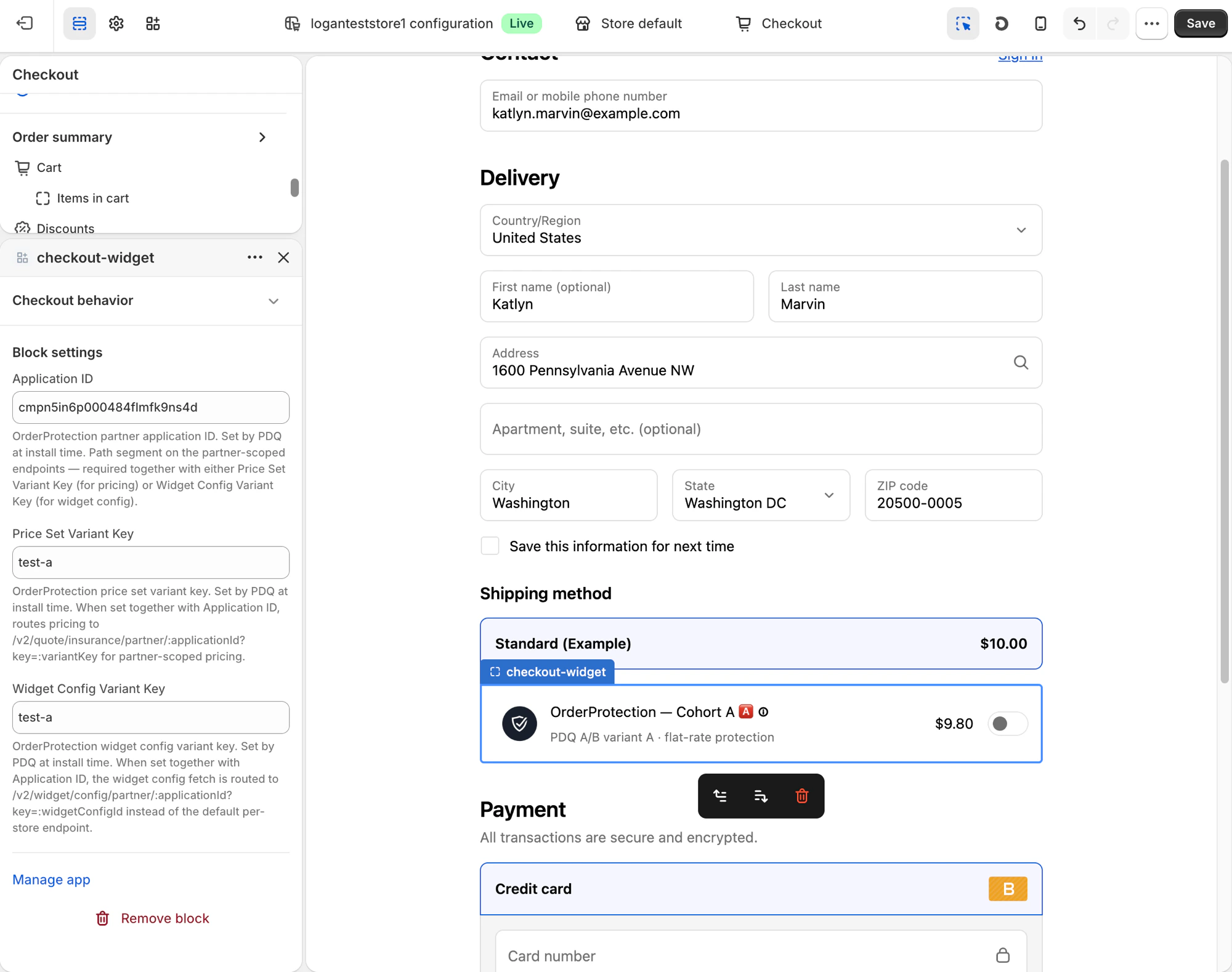 | Setting | Example | What it does |
| ----------------------------- | --------------------------- | ----------------------------------------------------------------------------------------------------------------------------------------------------- |
| **Application ID** | `cmpn5in6p000484flmfk9ns4d` | Your OAuth `Application.id`. Used as the path segment on the partner-scoped endpoints. Required together with at least one of the variant keys below. |
| **Price Set Variant Key** | `test-a` | Routes pricing to `GET /v2/quote/insurance/partner/:applicationId?key=:variantKey` for partner-scoped pricing. |
| **Widget Config Variant Key** | `test-a` | Routes the widget config fetch to `GET /v2/widget/config/partner/:applicationId?key=:variantKey` instead of the default per-store endpoint. |
All three fields are empty by default, in which case the extension uses the store's **default** per-store widget and pricing. Set the **Application ID plus at least one variant key** to activate partner-scoped behavior. The two variant keys are independent — you can A/B-test pricing and widget appearance separately.
## What the extension fetches
Once configured, on each checkout render the extension calls the partner-scoped endpoints below. Both are **public** (no OAuth token) and resolve the cohort from the path `applicationId` + `key` query param.
### Pricing — `GET /v2/quote/insurance/partner/:applicationId`
| Param | In | Required | Description |
| --------------- | ----- | -------- | -------------------------------------------------------------------------------- |
| `applicationId` | path | Yes | Your OAuth `Application.id`. |
| `key` | query | Yes | The **Price Set Variant Key** (`variantKey`). Must match the partner key format. |
| `store_url` | query | Yes | The merchant's store domain, e.g. `example.myshopify.com`. |
| `country` | query | No | ISO 2-letter country code. Defaults to `US`. |
```bash theme={null}
curl -G https://api.production.orderprotection.com/v2/quote/insurance/partner/cmpn5in6p000484flmfk9ns4d \
--data-urlencode "key=test-a" \
--data-urlencode "store_url=example.myshopify.com" \
--data-urlencode "country=US"
```
The response is the same shaped quote payload as the [public widget read](/developer/endpoints#public-widget-read-with-cohort), computed from the cohort's `SHIPPING` price set. Responses are cached for \~1 hour per `(store_url, country, applicationId, key)`.
**Errors**
* `400 Bad Request` — `key` is missing, or `applicationId`/`key` don't match the partner key format.
* `404 Not Found` — the store isn't found, the app isn't installed, or the cohort has no `SHIPPING` pricing rules.
### Widget config — `GET /v2/widget/config/partner/:applicationId`
| Param | In | Required | Description |
| --------------- | ----- | -------- | ----------------------------------------------------------------------------------------- |
| `applicationId` | path | Yes | Your OAuth `Application.id`. |
| `key` | query | Yes | The **Widget Config Variant Key** (`variantKey`). Must match the partner key format. |
| `store_url` | query | Yes | The merchant's store domain. |
| `type` | query | No | Widget type: `CART`, `CHECKOUT`, `INFO_MODAL`, or `SUBSCRIPTION`. Defaults to `CHECKOUT`. |
```bash theme={null}
curl -G https://api.production.orderprotection.com/v2/widget/config/partner/cmpn5in6p000484flmfk9ns4d \
--data-urlencode "key=test-a" \
--data-urlencode "store_url=example.myshopify.com" \
--data-urlencode "type=CHECKOUT"
```
```json theme={null}
{
"id": "pwc_8a1f2c…",
"type": "CHECKOUT",
"status": "ACTIVE",
"variant": "test-a",
"name": "Cohort A — flat-rate",
"config": { "...": "schemaless widget configuration — the renderer validates on read" },
"customizationValues": { "...": "read-only mirror of config, for legacy consumers" },
"updatedAt": "2026-05-26T18:46:25.987Z"
}
```
`config` and `customizationValues` always hold the same value; `customizationValues` is the legacy column name. Responses are cached for \~1 hour per `(store_url, applicationId, key, type)`.
**Errors**
* `400 Bad Request` — `key` is missing, or `applicationId`/`key` don't match the partner key format.
* `404 Not Found` — the store isn't found, the app has no active context on that store, or no widget config exists for that `(variantKey, type)`.
These endpoints **throw** `400`/`404` rather than silently falling back. Treat any non-`200` as "no partner cohort for this checkout" and render the store's default widget — a partner cohort must never break checkout.
## Default vs. cohort render
The explainer below walks the whole flow — authenticate, create variants, configure the extension, and render per shopper:
With no partner keys set, the extension renders the store's **default** widget:
| Setting | Example | What it does |
| ----------------------------- | --------------------------- | ----------------------------------------------------------------------------------------------------------------------------------------------------- |
| **Application ID** | `cmpn5in6p000484flmfk9ns4d` | Your OAuth `Application.id`. Used as the path segment on the partner-scoped endpoints. Required together with at least one of the variant keys below. |
| **Price Set Variant Key** | `test-a` | Routes pricing to `GET /v2/quote/insurance/partner/:applicationId?key=:variantKey` for partner-scoped pricing. |
| **Widget Config Variant Key** | `test-a` | Routes the widget config fetch to `GET /v2/widget/config/partner/:applicationId?key=:variantKey` instead of the default per-store endpoint. |
All three fields are empty by default, in which case the extension uses the store's **default** per-store widget and pricing. Set the **Application ID plus at least one variant key** to activate partner-scoped behavior. The two variant keys are independent — you can A/B-test pricing and widget appearance separately.
## What the extension fetches
Once configured, on each checkout render the extension calls the partner-scoped endpoints below. Both are **public** (no OAuth token) and resolve the cohort from the path `applicationId` + `key` query param.
### Pricing — `GET /v2/quote/insurance/partner/:applicationId`
| Param | In | Required | Description |
| --------------- | ----- | -------- | -------------------------------------------------------------------------------- |
| `applicationId` | path | Yes | Your OAuth `Application.id`. |
| `key` | query | Yes | The **Price Set Variant Key** (`variantKey`). Must match the partner key format. |
| `store_url` | query | Yes | The merchant's store domain, e.g. `example.myshopify.com`. |
| `country` | query | No | ISO 2-letter country code. Defaults to `US`. |
```bash theme={null}
curl -G https://api.production.orderprotection.com/v2/quote/insurance/partner/cmpn5in6p000484flmfk9ns4d \
--data-urlencode "key=test-a" \
--data-urlencode "store_url=example.myshopify.com" \
--data-urlencode "country=US"
```
The response is the same shaped quote payload as the [public widget read](/developer/endpoints#public-widget-read-with-cohort), computed from the cohort's `SHIPPING` price set. Responses are cached for \~1 hour per `(store_url, country, applicationId, key)`.
**Errors**
* `400 Bad Request` — `key` is missing, or `applicationId`/`key` don't match the partner key format.
* `404 Not Found` — the store isn't found, the app isn't installed, or the cohort has no `SHIPPING` pricing rules.
### Widget config — `GET /v2/widget/config/partner/:applicationId`
| Param | In | Required | Description |
| --------------- | ----- | -------- | ----------------------------------------------------------------------------------------- |
| `applicationId` | path | Yes | Your OAuth `Application.id`. |
| `key` | query | Yes | The **Widget Config Variant Key** (`variantKey`). Must match the partner key format. |
| `store_url` | query | Yes | The merchant's store domain. |
| `type` | query | No | Widget type: `CART`, `CHECKOUT`, `INFO_MODAL`, or `SUBSCRIPTION`. Defaults to `CHECKOUT`. |
```bash theme={null}
curl -G https://api.production.orderprotection.com/v2/widget/config/partner/cmpn5in6p000484flmfk9ns4d \
--data-urlencode "key=test-a" \
--data-urlencode "store_url=example.myshopify.com" \
--data-urlencode "type=CHECKOUT"
```
```json theme={null}
{
"id": "pwc_8a1f2c…",
"type": "CHECKOUT",
"status": "ACTIVE",
"variant": "test-a",
"name": "Cohort A — flat-rate",
"config": { "...": "schemaless widget configuration — the renderer validates on read" },
"customizationValues": { "...": "read-only mirror of config, for legacy consumers" },
"updatedAt": "2026-05-26T18:46:25.987Z"
}
```
`config` and `customizationValues` always hold the same value; `customizationValues` is the legacy column name. Responses are cached for \~1 hour per `(store_url, applicationId, key, type)`.
**Errors**
* `400 Bad Request` — `key` is missing, or `applicationId`/`key` don't match the partner key format.
* `404 Not Found` — the store isn't found, the app has no active context on that store, or no widget config exists for that `(variantKey, type)`.
These endpoints **throw** `400`/`404` rather than silently falling back. Treat any non-`200` as "no partner cohort for this checkout" and render the store's default widget — a partner cohort must never break checkout.
## Default vs. cohort render
The explainer below walks the whole flow — authenticate, create variants, configure the extension, and render per shopper:
With no partner keys set, the extension renders the store's **default** widget:
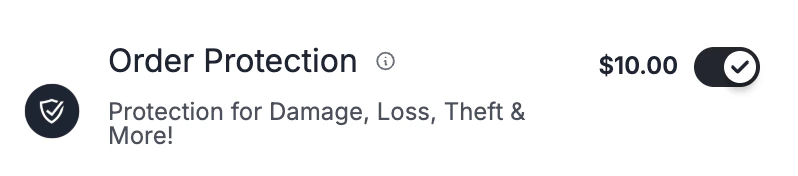 With Application ID + variant key `test-a`, the same checkout resolves the cohort's price set and widget config — for example **OrderProtection — Cohort A** at `$9.80` with flat-rate protection, as shown in the checkout preview above.
## Next steps
Register your app, create variants, and route shoppers — the setup this page depends on.
Full schema for every `/v2` partner endpoint, including the contexts, pricing, and widget-config writes.
Register an OAuth app and capture your `Application.id`, client ID, and secret.
Scopes your app needs to create contexts, price sets, and widget configs.
With Application ID + variant key `test-a`, the same checkout resolves the cohort's price set and widget config — for example **OrderProtection — Cohort A** at `$9.80` with flat-rate protection, as shown in the checkout preview above.
## Next steps
Register your app, create variants, and route shoppers — the setup this page depends on.
Full schema for every `/v2` partner endpoint, including the contexts, pricing, and widget-config writes.
Register an OAuth app and capture your `Application.id`, client ID, and secret.
Scopes your app needs to create contexts, price sets, and widget configs.